Overview
A Telegram notification channel sends SigNoz alerts to a Telegram chat through a bot. SigNoz posts one message for each alert that fires. It also posts a message when the alert resolves. You can reuse the channel in any alert rule.
Prerequisites
Before you configure Telegram as a notification channel, you need:
- Telegram account and chat: A group, or a topic in a forum group, that receives the alerts.
- SigNoz version: v0.147.0 or later.
- SigNoz permission:
notification-channel:create, which the Admin role has.
Create a Telegram Channel
Step 1. Create a bot
- In Telegram, open a chat with @BotFather.
- Send
/newbotand follow the prompts to choose a name and a username. - Copy the bot token that BotFather returns. The token looks like
123456789:AA....
For the full bot setup, see Telegram: Building your first bot.
Step 2. Add the bot to the chat and get the chat ID
-
Add the bot to the group that receives the alerts.
-
In the group, send
/start@<bot-username>. A bot in a group sees only commands that name it, so this message makes the chat visible to the bot. -
Open the following URL in a browser. Replace
<bot-token>with the token from Step 1.https://api.telegram.org/bot<bot-token>/getUpdates -
In the response, find the message you sent. Copy the number in
message.chat.id. The ID of a group is negative, for example-1001234567890.
To post into one topic of a forum group, also copy message.message_thread_id from a message you sent in that topic. The General topic has no thread ID, so leave the field empty for it.
Step 3. Create the notification channel in SigNoz
- Navigate to
Alerts > Configuration > Notification Channelsand click New Channel. - In the General section, enter a Name and select Telegram as the Type. Leave Send resolved alerts on to also get a message when an alert stops firing.
- In the Connection section, paste the bot token into Bot token and the chat ID into Chat ID. For a forum topic, enter the topic ID in Message thread ID.
- In the Message section, keep the default Title and Message templates, or edit them as described in Customize the Message.
- Continue with Validate to test the channel and save it.

Validate
- On the channel form, click Test. SigNoz sends a test alert to the chat.
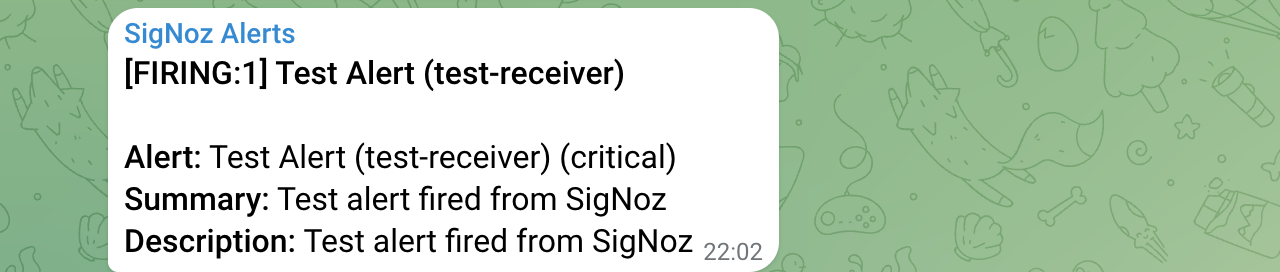
- Open the Telegram chat. A message that starts with
[FIRING:1] Test Alert (test-receiver)appears within a few seconds. - Click Save. The channel now appears in the list under
Alerts > Configuration > Notification Channels.
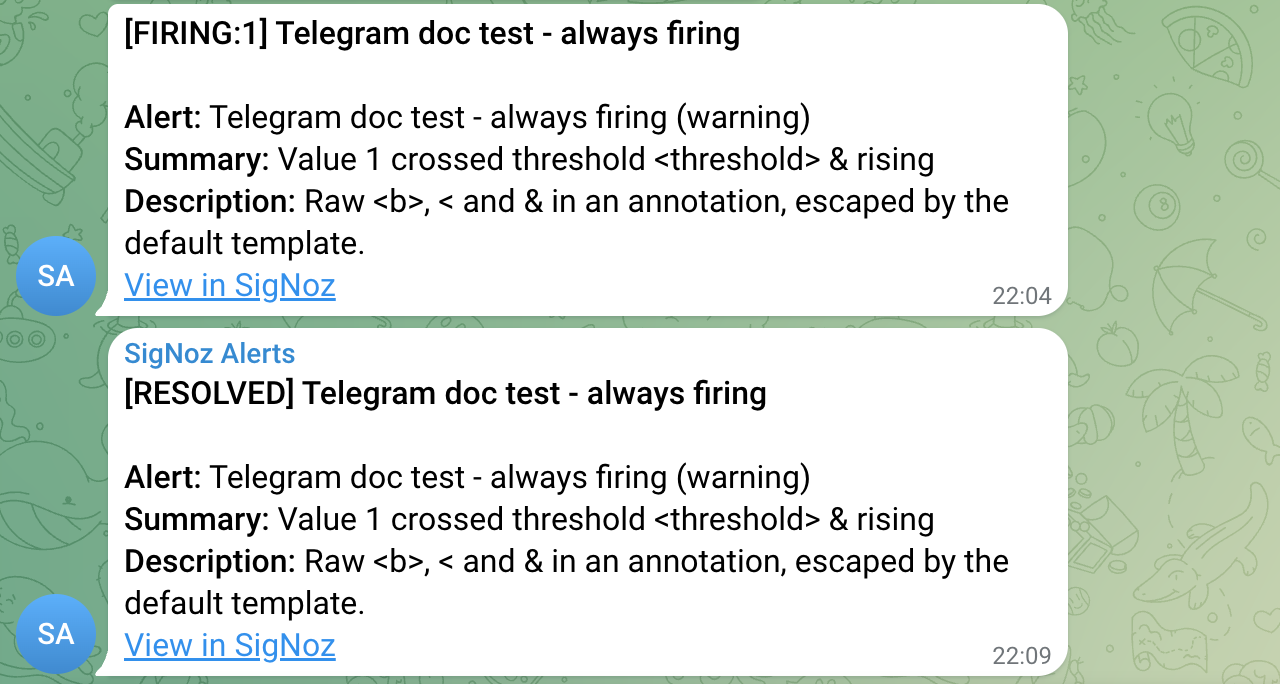
- In an alert rule, select the Telegram channel. SigNoz then posts to the chat each time that rule fires and, with Send resolved alerts on, each time it resolves. The message shows the alert name, the severity, the summary and the description of the alert, and a View in SigNoz link.
Customize the Message
The Title and Message boxes accept Go templates, so they can read values from the alert. SigNoz sends the Title in bold above the Message.
SigNoz always sends the message to Telegram as HTML. Use only the tags that Telegram supports, such as <b>, <i>, <code>, and <a href="...">. See Telegram: HTML style for the full list. In the Title and Message boxes, Markdown is not supported. Telegram shows **bold** as plain text.
Telegram rejects the whole message when it finds a tag it does not know, such as <value> or <h1>. Escape every <, >, and & that is not part of a tag or an entity: write <, >, and &. For example, write latency < 5s and <value>. To insert alert values safely, pipe them through the html function, as the default template does.
{{ range .Alerts -}}
<b>{{ .Labels.alertname | html }}</b> is {{ .Status }}
<i>{{ .Annotations.summary | html }}</i>
<a href="{{ .GeneratorURL | html }}">Open in SigNoz</a>
{{ end }}
Telegram allows at most 4096 characters in one message. SigNoz cuts off a longer message at that limit.

The Advanced section has two more options:
- Send silently: Delivers the message without a notification sound.
- Bot API URL: Sends the message to a self-hosted Telegram Bot API server. Leave it empty to use
https://api.telegram.org.
Configure Programmatically
You can create the channel with the SigNoz API instead of the UI.
API Endpoint: POST /api/v2/notification_channels
curl -X POST "<your-signoz-url>/api/v2/notification_channels" \
  -H 'SIGNOZ-API-KEY: <your-api-key>' \
  -H 'Content-Type: application/json' \
  -d '{
    "name": "telegram-infra",
    "displayName": "Telegram Infra",
    "config": {
      "kind": "telegram",
      "spec": {
        "botToken": "<bot-token>",
        "chatId": <chat-id>
      }
    }
  }'
Verify these values:
<your-signoz-url>: The base URL of your SigNoz instance, for examplehttps://<your-organization>.signoz.cloud.<your-api-key>: An API key of a service account with the Admin role. See Service Accounts to create one.<bot-token>: The token from Step 1, as a string.<chat-id>: The chat ID from Step 2, as a number without quotes.
To post into a forum topic, add "messageThreadId": <topic-id> to spec. Write the topic ID as a number without quotes.
To test the settings without saving a channel, send the config object to POST /api/v2/notification_channels/test. The endpoint returns 204 when Telegram accepts the message.
Request body attributes:
| Field | Type | Description |
|---|---|---|
name | string | The immutable channel identifier: lowercase letters, digits, and hyphens, at most 63 characters. Required unless generateName is true. |
displayName | string | The name that the UI shows and that alert rules select. Defaults to name. Required when generateName is true. |
generateName | boolean | Builds name from displayName plus a random suffix. name must then be empty. The default is false. |
config.kind | string | Must be telegram. |
config.spec.botToken | string | The bot token. Required. |
config.spec.chatId | number | The numeric chat ID. Required. A string such as @mygroup is rejected. |
config.spec.messageThreadId | number | The topic ID inside a forum group. |
config.spec.title | string | Go template for the title. |
config.spec.message | string | Go template for the message body. |
config.spec.sendResolved | boolean | Whether to send a message when the alert resolves. The default is true. |
config.spec.disableNotifications | boolean | Sends the message without a notification sound. |
config.spec.apiUrl | string | The URL of a self-hosted Bot API server. |
The API rejects an unknown field in config.spec. For example, parseMode returns json: unknown field "parseMode", because the parse mode is always HTML.
Troubleshooting
getUpdates returns an empty result
Telegram keeps an update for at most 24 hours, and getUpdates does not work while the bot has a webhook. Send /start@<bot-username> in the group again, and reload the getUpdates URL right away. If the bot has a webhook, open https://api.telegram.org/bot<bot-token>/deleteWebhook first. If another service uses the bot through that webhook, create a separate bot for SigNoz instead.
Error: group chat was upgraded to a supergroup chat
Telegram changed the chat ID of the group, for example when you turned on Topics. Read the new ID from getUpdates and update Chat ID. The error response includes the new ID in migrate_to_chat_id.
Error: value of type 'string' was received for field 'chatId'
SigNoz accepts only the numeric chat ID. It does not accept @username. Use the ID from getUpdates.
Error: unexpected status code 401 ... Unauthorized
The bot token is wrong or revoked. Copy the token from @BotFather again.
Error: can't parse entities: Unsupported start tag "value"
The message contains text that looks like an HTML tag, and Telegram does not support that tag. Escape the text as <value>, or pipe the alert value through html in the template.
Error: is not authorized to perform notification-channel:create
Your user or API key does not have the notification-channel:create permission. Use an Admin account, or ask an Admin to grant the permission to your role.
The message arrives but View in SigNoz is plain text
On Self-Hosted SigNoz, the link needs the external URL of your instance. Set SIGNOZ_GLOBAL_EXTERNAL__URL to the URL that users open in the browser, for example https://signoz.example.com, and restart SigNoz. See Serving SigNoz on an External URL. The Test button never shows a link, because a test alert has no source URL.
Next Steps
- Create an alert rule and select the Telegram channel.
- Set up other notification channels such as Slack, PagerDuty, or Email.
- Migrate the notification channel API from v1 to v2 if you manage channels through the API.
Get Help
If you need help with the steps in this topic, please reach out to us on SigNoz Community Slack. If you are a SigNoz Cloud user, please use in product chat support located at the bottom right corner of your SigNoz instance or contact us at cloud-support@signoz.io.


