What is LangChain and LangGraph Observability?
LangChain and LangGraph observability gives you real-time visibility into your AI agent workflows by collecting traces, spans, and logs using OpenTelemetry. This guide shows you how to instrument your Python-based LangChain or LangGraph application and send telemetry to SigNoz, so you can monitor agent reasoning steps, tool invocations, chain executions, and model responses end-to-end.
With full LangChain and LangGraph observability in SigNoz, you can trace every user request from the initial prompt through each reasoning step, tool execution, and final answer. Correlate traces with logs, set alerts for latency or errors, and continuously improve the reliability of your AI applications.
To get started, check out our example LangChain trip planner agent with OpenTelemetry-based observability/monitoring (via OpenInference). View the LangChain trip planner agent repository.
You can also check out our LangChain SigNoz MCP agent repository.
Prerequisites
- A Python application using Python 3.8+
- LangChain/LangGraph integrated into your app
- Basic understanding of AI Agents and tool calling workflow
- SigNoz setup (choose one):
- SigNoz Cloud account with an active ingestion key
- Self-hosted SigNoz instance
pipinstalled for managing Python packages- Internet access to send telemetry data to SigNoz Cloud
- (Optional but recommended) A Python virtual environment to isolate dependencies
Instrument LangChain and LangGraph with OpenTelemetry
To capture detailed telemetry from LangChain/LangGraph without modifying your core application logic, we use OpenInference, a community-driven standard that provides pre-built instrumentation for popular AI frameworks like LangChain, built on top of OpenTelemetry. This allows you to trace your LangChain application with minimal configuration.
Check out the openinference-instrumentation-langchain package on PyPI for detailed setup instructions.
No-code auto-instrumentation is recommended for quick setup with minimal code changes. It's ideal when you want to get observability up and running without modifying your application code and are leveraging standard instrumentor libraries.
Step 1: Install the necessary packages in your Python environment.
pip install \
  opentelemetry-distro \
  opentelemetry-exporter-otlp \
  opentelemetry-instrumentation-httpx \
  opentelemetry-instrumentation-system-metrics \
  langgraph \
  langchain \
  openinference-instrumentation-langchain
Step 2: Add Automatic Instrumentation
opentelemetry-bootstrap --action=install
Step 3: Configure logging level
To ensure logs are properly captured and exported, configure the root logger to emit logs at the INFO level or higher:
import logging

logging.getLogger().setLevel(logging.INFO)
This sets the minimum log level for the root logger to INFO, which ensures that logger.info() calls and higher severity logs (WARNING, ERROR, CRITICAL) are captured by the OpenTelemetry logging auto-instrumentation and sent to SigNoz.
Step 4: Run an example
from langchain.agents import create_agent

def add_numbers(a: int, b: int) -> int:
    """Add two numbers together and return the result."""
    return a + b

agent = create_agent(
    model="openai:gpt-5-mini",
    tools=[add_numbers],
    system_prompt="You are a helpful math tutor who can do calculations using the provided tools.",
)

# Run the agent
agent.invoke(
    {"messages": [{"role": "user", "content": "what is 42 + 58?"}]},
)
📌 Note: Ensure that the
OPENAI_API_KEYenvironment variable is properly defined with your API key before running the code.
Step 5: Run your application with auto-instrumentation
OTEL_RESOURCE_ATTRIBUTES="service.name=<service_name>" \
OTEL_EXPORTER_OTLP_ENDPOINT="https://ingest.<region>.signoz.cloud:443" \
OTEL_EXPORTER_OTLP_HEADERS="signoz-ingestion-key=<your-ingestion-key>" \
OTEL_EXPORTER_OTLP_PROTOCOL=grpc \
OTEL_TRACES_EXPORTER=otlp \
OTEL_METRICS_EXPORTER=otlp \
OTEL_LOGS_EXPORTER=otlp \
OTEL_PYTHON_LOG_CORRELATION=true \
OTEL_PYTHON_LOGGING_AUTO_INSTRUMENTATION_ENABLED=true \
opentelemetry-instrument <your_run_command>
<service_name>is the name of your service<region>: Your SigNoz Cloud region<your-ingestion-key>: Your SigNoz ingestion key- Replace
<your_run_command>with the actual command you would use to run your application. For example:python main.py
Using self-hosted SigNoz? Most steps are identical. To adapt this guide, update the endpoint and remove the ingestion key header as shown in Cloud → Self-Hosted.
Code-based instrumentation gives you fine-grained control over your telemetry configuration. Use this approach when you need to customize resource attributes, sampling strategies, or integrate with existing observability infrastructure.
Step 1: Install OpenInference and OpenTelemetry related packages
pip install openinference-instrumentation-langchain \
opentelemetry-exporter-otlp \
opentelemetry-sdk \
langgraph \
langchain
Step 2: Import the necessary modules in your Python application
from opentelemetry.sdk.trace import TracerProvider
from opentelemetry.sdk.trace.export import BatchSpanProcessor
from opentelemetry.exporter.otlp.proto.http.trace_exporter import OTLPSpanExporter
from opentelemetry.sdk.resources import Resource
from openinference.instrumentation.langchain import LangChainInstrumentor
Step 3: Set up the OpenTelemetry Tracer Provider to send traces directly to SigNoz Cloud
resource = Resource.create({"service.name": "<service_name>"})
provider = TracerProvider(resource=resource)
span_exporter = OTLPSpanExporter(
    endpoint="https://ingest.<region>.signoz.cloud:443/v1/traces",
    headers={"signoz-ingestion-key": "<your-ingestion-key>"},
)
provider.add_span_processor(BatchSpanProcessor(span_exporter))
<service_name>is the name of your service- Set the
<region>to match your SigNoz Cloud region - Replace
<your-ingestion-key>with your SigNoz ingestion key
Using self-hosted SigNoz? Most steps are identical. To adapt this guide, update the endpoint and remove the ingestion key header as shown in Cloud → Self-Hosted.
Step 4: Instrument LangChain using OpenInference
Use the LangChainInstrumentor from OpenInference to automatically trace LangChain operations with your OpenTelemetry setup:
LangChainInstrumentor().instrument()
📌 Important: Place this code at the start of your application logic — before any LangChain/LangGraph functions are called or used — to ensure telemetry is correctly captured.
Step 5: Run an example
from langchain.agents import create_agent

def add_numbers(a: int, b: int) -> int:
    """Add two numbers together and return the result."""
    return a + b

agent = create_agent(
    model="openai:gpt-5-mini",
    tools=[add_numbers],
    system_prompt="You are a helpful math tutor who can do calculations using the provided tools.",
)

# Run the agent
agent.invoke(
    {"messages": [{"role": "user", "content": "what is 42 + 58?"}]},
)
📌 Note: Ensure that the
OPENAI_API_KEYenvironment variable is properly defined with your API key before running the code.
Once configured, LangChain and LangGraph automatically emit traces, spans, and attributes for every agent request.
LangChain and LangGraph traces are available in SigNoz under the Traces tab:

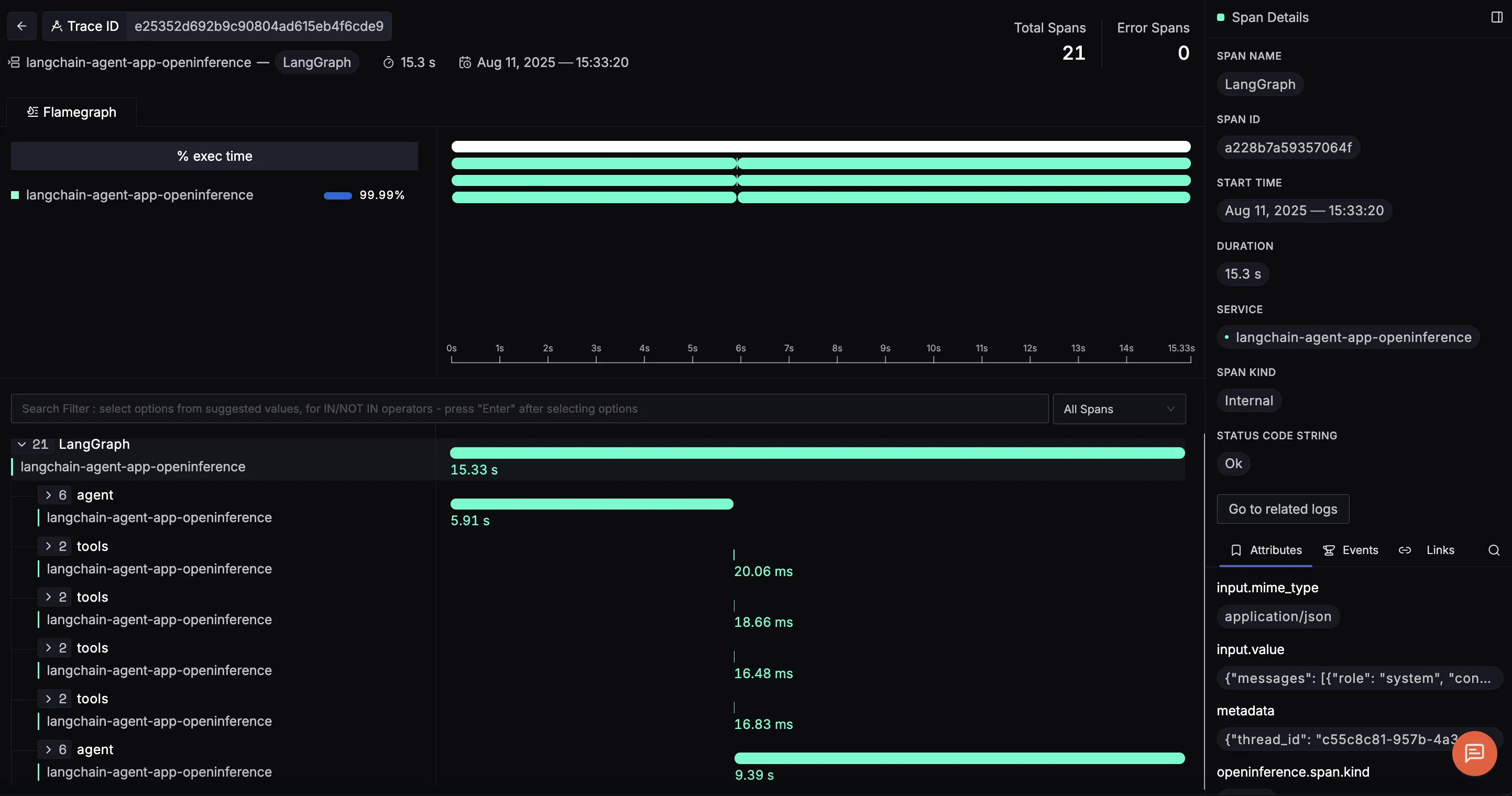
When you click on a trace ID in SigNoz, you'll see a detailed view of the trace, including all associated spans, along with their events and attributes:
Use the SigNoz MCP to automatically recognize important LangChain and LangGraph trace attributes and create a custom dashboard using natural language, with no manual configuration needed.
LangChain and LangGraph Observability in JavaScript
You can instrument your LangChain/LangGraph applications in JavaScript using the OpenInference LangChain Instrumentor package.
For detailed guidance on instrumenting JavaScript applications with OpenTelemetry and connecting them to SigNoz, see the SigNoz OpenTelemetry JavaScript instrumentation docs.
Additional resources:
- Watch the LangGraph observability walkthrough
- Watch the LangChain agent monitoring walkthrough
- Read LangChain Observability with OpenTelemetry
- Read Monitoring a LangChain Agent that uses the SigNoz MCP
- Set up alerts for high latency or error rates
- Learn more about querying traces


