Span links connect a span to related spans without making them parent and child. Use them to correlate work across asynchronous boundaries, such as a message queue or a scheduled batch job, where the related spans live in separate traces.
Overview
A span link is a typed pointer from one span to another. OpenTelemetry uses links to associate one span with one or more spans, implying a causal relationship, even when one span never directly called the other. Each link stores the SpanContext of the target span, its trace ID and span ID, plus zero or more attributes. The target can sit in the same trace or a separate one.
Parent-child works when a caller starts an operation and waits for it inside the same trace. That breaks once work crosses a queue or runs later in a batch: the downstream operation begins a fresh trace with its own trace ID and no parent, so the path back to what triggered it is gone. A span link restores that path.
Add links when you start the span. A head sampler sees only what exists at span creation, so a link attached afterward may not influence its sampling decision.
Span links vs parent-child relationships
| Aspect | Parent-child | Span link |
|---|---|---|
| Relationship | Direct call, caller waits | Causal, no direct call |
| Trace boundary | Same trace | Same or different trace |
| Cardinality | One parent per span | Many links per span |
| Typical use | Synchronous calls | Queues, batch jobs, fan-out/fan-in |
The OpenTelemetry messaging conventions use span links, rather than parent-child, as the default way to correlate producers and consumers. Three constraints drive that choice:
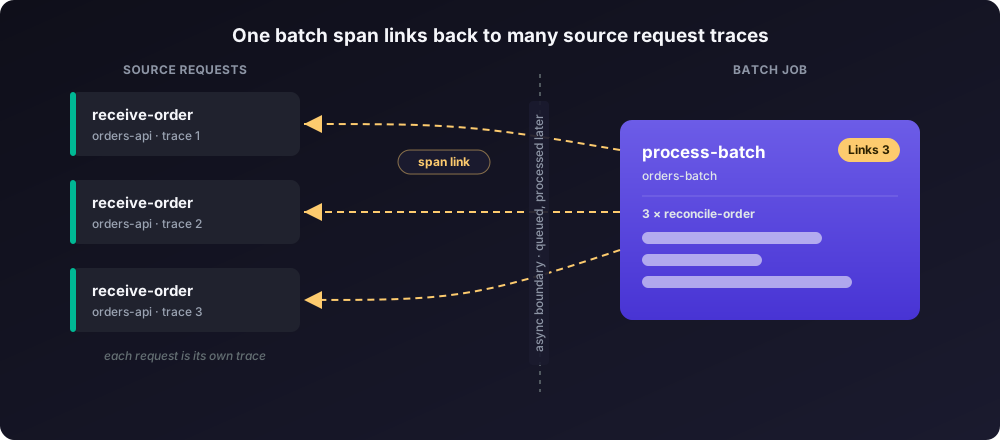
- A span has exactly one parent. When one span processes a batch of items that each arrived in a different trace, parent-child can represent at most one of them. Links represent all of them.
- A consumer often runs inside another active context, such as an HTTP server span. That context is already its parent, so the tie back to the producer has to be a link.
- Links stay consistent across queue, streaming, and pub/sub systems, whose delivery models otherwise differ.
Common use cases
- Batch processing and fan-in. A scheduled job processes many independent requests in one run. Each request created its own trace earlier. The batch span links to every request it handles, so you keep traceability from the batch back to each source.
- Asynchronous messaging. A producer publishes to a queue and a consumer processes the message later in its own trace. The consumer span links to the producer span. Instrumentation libraries for common brokers propagate the trace context for you. For a single message, you can set the producer context as the parent; a link keeps the consumer in its own trace.
- Fan-out. One span starts several parallel operations. Each downstream span links back to the initiator.
Example: link a batch job to its source requests
This example uses Python for a batch job that processes work from many separate traces. An API receives requests through the day, traces each one, and enqueues it. Every hour, a job processes the batch in one span that links to each original request.
The same pattern applies in any OpenTelemetry SDK. For the link API in your language, see the manual instrumentation guides for Python and Java.
Capture trace context when you enqueue work
The batch runs after each request finishes, so the worker cannot use the original span object. Capture the request's trace context as W3C Trace Context headers and store them with the queued item:
from opentelemetry import trace
from opentelemetry.trace.propagation.tracecontext import TraceContextTextMapPropagator

tracer = trace.get_tracer("orders.api")
propagator = TraceContextTextMapPropagator()

def handle_request(item):
    with tracer.start_as_current_span("receive-order"):
        # ... validate and store the incoming request ...

        # Capture the current trace context to persist with the item.
        carrier = {}
        propagator.inject(carrier)        # writes "traceparent" into carrier
        item["trace_context"] = carrier   # store alongside the item (DB or queue)
        enqueue(item)
propagator.inject() writes the active span's context into carrier as a traceparent value. Persist carrier with the item so the batch job can rebuild the context later.
Link the batch span to every request
When the job runs, rebuild a link from each stored context and pass them all to one span:
from opentelemetry import trace
from opentelemetry.trace.propagation.tracecontext import TraceContextTextMapPropagator

tracer = trace.get_tracer("orders.batch")
propagator = TraceContextTextMapPropagator()

def process_batch(items):
    links = []
    for item in items:
        ctx = propagator.extract(item["trace_context"])      # carrier -> Context
        span_context = trace.get_current_span(ctx).get_span_context()
        if span_context.is_valid:
            links.append(trace.Link(span_context))

    with tracer.start_as_current_span("process-batch", links=links) as batch_span:
        batch_span.set_attribute("batch.size", len(items))
        for item in items:
reconcile(item)propagator.extract()turns each stored carrier back into aContext.trace.get_current_span(ctx).get_span_context()reads the source request'sSpanContextfrom that context.trace.Link(span_context)builds one link per request, andlinks=linksattaches them all toprocess-batchat creation.
The process-batch span now references every request it handled, a many-to-one relationship that a single parent cannot express.
View span links in SigNoz
Run the batch job, then open the Trace Explorer to inspect the traces.
Open the batch trace from orders-batch and select the process-batch span. In the Span Details panel, open the Links tab. The count (Links 5) matches batch.size, and the tab lists one Linked Span ID for every request the batch processed.

Each Linked Span ID is the receive-order span from a request's own trace. Click one to open that trace, even though it lives separately from the batch run.

You can trace backward from a batch run to each request it handled, which helps debug async and scheduled work.
Limitations
- The Links tab lists span references that are not parent-child relationships. SigNoz renders parent-child relationships in the waterfall.
- The Links tab shows only each linked Span ID, not the linked span's attributes or events. Click the badge to open that span for the full detail.
Next steps
Get Help
If you need help with the steps in this topic, please reach out to us on SigNoz Community Slack. If you are a SigNoz Cloud user, please use in product chat support located at the bottom right corner of your SigNoz instance or contact us at cloud-support@signoz.io.


