Elasticsearch vs OpenSearch - Key Differences 5 Years Down the Line
It’s been 5 years since Elasticsearch moved from the truly permissive Apache 2.0 open-source license to the proprietary Elastic and SSPL to prevent AWS from offering a managed Elasticsearch service. Amazon then created a fork of Elasticsearch, called OpenSearch, to continue offering its managed services.
Although the core foundations(read Lucene) were similar, the two products have evolved in their own ways to cater to their users. In this article, we will highlight the key differences between Elasticsearch and OpenSearch to help you decide which to choose.
Before we dive deeper, here’s the TL;DR of why you should go for either of the tools:
Choose OpenSearch if:
- You require an open license: The Apache 2.0 license allows you to use, modify, and distribute the software freely without legal restrictions.
- You need free enterprise security: You want critical features like SSO, audit logging, and role-based access control included in the free standard distribution.
- You are All-In on AWS: Your infrastructure runs exclusively on AWS, as cloud providers such as Google Cloud and Azure do not offer native managed services for OpenSearch.
Choose Elasticsearch if:
- Performance is your top priority: Benchmarks by Elastic (released in 2023) show it is up to 140% faster on complex queries and significantly more storage-efficient than OpenSearch.
- You require a fully integrated platform: You prefer a polished platform with deep integration for GenAI/ML retrievers and a single, unified observability agent.
- You run multi-cloud: You need a consistent, managed experience across AWS, Azure, and Google Cloud (via Elastic Cloud), rather than being locked into one provider.
Since OpenSearch was a fork of Elasticsearch, there is a lot that they share. Let’s understand where they still share similarities before we discuss their current state.
Where They Still Align
Before we analyse the differences, it is essential to understand that these tools still share a massive amount of DNA. If you know how to operate one, the learning curve for the other is minimal.
1. Apache Lucene Core
Both engines run on Apache Lucene, which is an underlying Java library that handles the heavy lifting of indexing, storing, and retrieving documents. While the data search algorithm is identical, Elasticsearch has recently optimised its engine for raw speed (sorting/computing), whereas OpenSearch focuses on stability and keeping up with Lucene upgrades. For 90% of text search use cases, you won't feel a difference.
2. Distributed Architecture
The system design allows the database to split data across multiple servers (nodes) to handle growth with auto-healing capabilities. Both engines handle growth the same way and partition your data across the cluster. If a server fails, the system automatically rebalances to keep running.
3. Ingestion Ecosystem
Neither platform locks you into a specific data shipper. Industry standards like Logstash, Fluentd, and Fluent Bit work perfectly with both. Elastic aims to deliver a curated experience with its proprietary Elastic Agent. OpenSearch leans heavily into open standards, integrating naturally with OpenTelemetry and Data Prepper without pushing a specific vendor tool.
Key Differences in 2026: The Growing Gap
While they share the same roots, they aren't clones anymore. Moving forward, choosing one over the other will change how much you pay, how your team works every day, and which licenses you need to comply with.
1. Licensing and Governance Model
The legal framework that defines how you can use, modify, and resell the software.
Elasticsearch: Operates under a complex structure. The default distribution uses the Elastic License v2 and the SSPL, both of which are source-available but proprietary. In 2024, Elastic added the AGPLv3 as an option for the core codebase. While AGPL is an OSI-approved license, it is a copyleft license. That means if you modify the code and distribute it over a network, you may be required to release your own source code. This creates a compliance minefield for companies embedding search into their products.
OpenSearch: Remains purely Apache 2.0. In 2024, the project moved under the OpenSearch Software Foundation (part of the Linux Foundation). This governance change guarantees that no single vendor (not even AWS) controls the roadmap.
The Verdict: If you are building an internal tool, either works. If you are building a SaaS product or embedding search into software you sell, OpenSearch eliminates the risk of legal complications.
2. Security Features & Pricing
The distinction between these engines is whether enterprise-grade features are treated as standard or as a premium upgrade.
Elasticsearch: Operates on a Freemium model with a clear ceiling. You pay nothing for basic search, but for critical enterprise tools like Cross-Cluster Replication (CCR), Searchable Snapshots, Single Sign-On (SSO) and Machine Learning, you will need a paid model.
OpenSearch: Treats security as a core requirement, not an upsell. Operates on an Infrastructure Only model. The software cost is $0 regardless of scale. Features that are paid for in Elastic (Security, Alerting, Anomaly Detection) are free here.
The Verdict: OpenSearch is the clear winner. You get the necessary audit trails and access controls without having to buy an enterprise license.
3. Observability and APM Strategy
The primary strategic difference lies in whether you prefer a proprietary, all-in-one agent or an open-standard architecture based on OpenTelemetry.
Elasticsearch: Pushes the Elastic Agent. It’s a polished, single binary that does everything (logs, metrics, security), but it locks you into their ecosystem.
OpenSearch: Pushes an OpenTelemetry First strategy. It does not have its own APM agents. Instead, it relies on industry-standard OpenTelemetry (OTel) collectors and Data Prepper to ingest traces.
The Verdict: Choose Elasticsearch if you want a seamless, pre-configured experience and don't mind lock-in. Choose OpenSearch if your organisation has already adopted OpenTelemetry as a standard and wants a vendor-neutral collection layer.
4. Cloud Integration
The strategic choice depends on whether you require a consistent, feature-rich experience across multiple cloud providers or a deeply embedded, native integration within the AWS ecosystem.
Elasticsearch: Delivers true cloud neutrality. Elastic Cloud provides identical control planes, APIs, and feature sets (including Serverless and AI) across AWS, Azure, and Google Cloud.
OpenSearch: Is heavily AWS-centric. While the managed service on AWS is first-class, there is no native equivalent on Azure or GCP.
The Verdict: If your infrastructure is strictly AWS, OpenSearch is a natural fit. If you require a multi-cloud strategy with a single way of working, Elastic Cloud offers superior consistency.
5. Vector Search and AI Engines
The choice between these engines depends on whether you prioritise a natively integrated AI toolkit or a high-performance, plugin-based architecture for custom models.
Elasticsearch: It has a built-in AI engine that is ready to go immediately. If you want to add features like semantic search (finding things by meaning, not just keywords) to your app without hiring a team of data scientists, this is your best option.
OpenSearch: Instead of a fixed engine, it lets you plug in heavy-duty, industry-standard AI tools (the same ones used by tech giants like Meta). This makes it the better choice if you are building a massive, highly complex AI system and need software that can handle heavier data loads than standard search engines can.
The Verdict: Choose Elasticsearch if you want a polished, single-setup AI experience. Choose OpenSearch if you are an AI expert who needs total control to run massive, complex models.
6. Migration and Interoperability
The strategic challenge lies in the one-way nature of data portability. Transitioning to OpenSearch is a supported path, but returning to Elasticsearch often requires a complete rebuild.
Elasticsearch: Migrating from Elasticsearch to OpenSearch is often possible (and supported by AWS tools) because OpenSearch maintains backward compatibility with older Elastic APIs.
The strategic challenge lies in the one-way nature of data portability. Transitioning to OpenSearch is a supported path but returning to Elasticsearch often requires a complete rebuild.
7. UI/UX and Daily Workflow
The decision depends on whether your team requires a polished, drag-and-drop interface for broad accessibility or a functional, engineer-focused toolkit for technical analysis.
Elasticsearch (Kibana): It provides a professional, user-friendly workspace that eliminates the need to write complex scripts. By streamlining dashboard creation, it ensures that data is accessible to the entire organisation rather than just the engineering team.
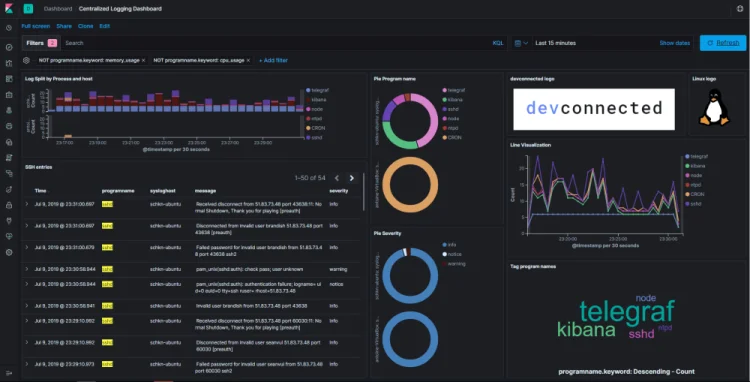
OpenSearch (Dashboards): It maintains a functional, developer-first design that favours raw data exploration over visual simplicity. Its workflow is optimised for technical teams who require deep investigative capabilities and flexible, code-driven reporting rather than drag-and-drop ease.
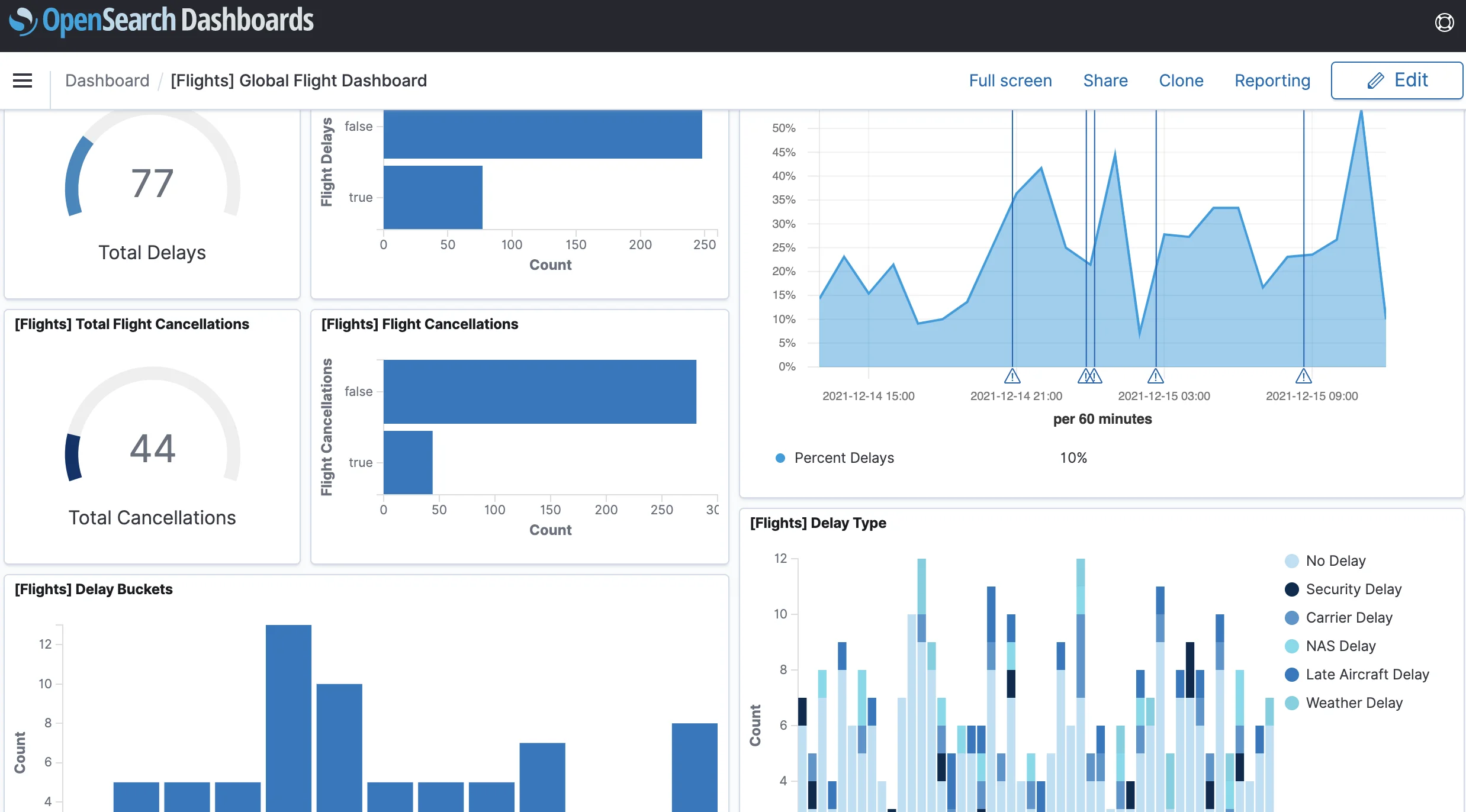
The Verdict: Choose Elasticsearch if your goal is to empower a broad range of users with enterprise-grade visual analytics. Choose OpenSearch if the primary users are engineers who need a robust toolkit for system analysis and debugging.
Difference in a Glance
| Feature | Elasticsearch (Elastic NV) | OpenSearch (AWS) |
|---|---|---|
| 1. License & Governance | Proprietary / Copyleft (SSPL, Elastic License v2, or AGPLv3). Controlled by single vendor (Elastic NV). | Truly Open Source (Apache 2.0). Controlled by community foundation (Linux Foundation). |
| 2. Security & Cost | Freemium Features like SSO, Audit Logs, and ML require paid license. | Free Infrastructure All enterprise security features (SSO, Audit Logs) included at $0 cost. |
| 3. Observability Agent | Elastic Agent Polished, unified binary. Easier setup but creates ecosystem lock-in. | OpenTelemetry First Relies on vendor-neutral standards (OTel Collectors, Data Prepper). |
| 4. Cloud Strategy | Multi-Cloud Agnostic Consistent experience across AWS, Azure, & GCP via Elastic Cloud. | AWS Centric Native integration on AWS and no managed service equivalent on Azure/GCP. |
| 5. AI & Vectors | Built-in Engine Native semantic search. | Plugin Architecture Wraps heavy-duty tools (like Meta's FAISS) for massive, complex models. |
| 6. Migration Path | Difficult to Return Official clients block OpenSearch. Moving back often requires a rebuild. | One-Way Supported Compatible with older Elastic APIs and supported tools exist for moving to OpenSearch. |
| 7. UI/UX Workflow | Kibana (Democratized) Polished, low-code interface designed for business analysts & executives. | Dashboards (Technical) Functional, developer-centric workspace optimized for deep investigation. |
Both Elasticsearch and OpenSearch pitch themselves as search and observability products. But these tools were built to solve full-text search first, and then evolved into also offering observability. If you want a comprehensive application observability suite, SigNoz can be a better alternative to Elasticsearch and OpenSearch.
SigNoz - An alternative to Elasticsearch/Opensearch for Observability
While Elasticsearch and OpenSearch are powerful general-purpose search engines, using them for observability (logs, metrics, and traces) at scale introduces architectural challenges. Both rely on inverted indexes, a data structure designed for text search, which can be heavy on storage and memory when used for high-volume observability data.
SigNoz is a unified observability platform native to OpenTelemetry. Unlike the ELK stack, which often requires a mix of agents, SigNoz is designed to ingest OTel data directly.
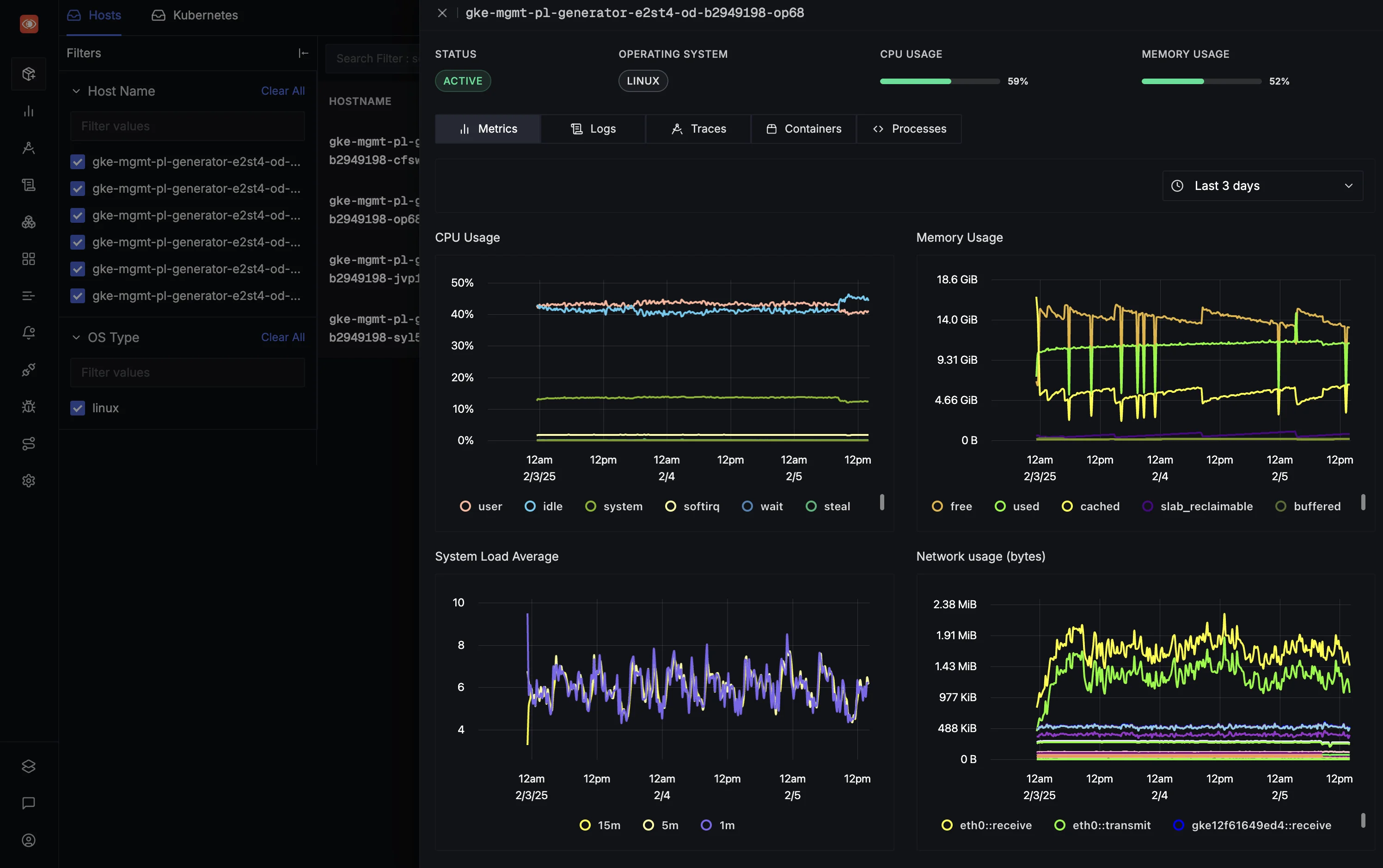
It runs a columnar database, rather than the Lucene-based engine used by Elasticsearch and OpenSearch.
- Compression: Columnar storage offers superior compression for logs and metrics, often reducing storage costs and more when compared to Lucene-based stores.
- Aggregation Speed: SigNoz backend is designed for fast aggregations. This significantly speeds up dashboard loading for large datasets.
- No Index Management: You do not need to manage complex index mappings or worry about cardinality explosions that can crash an Elasticsearch cluster.
You can choose between various deployment options in SigNoz. The easiest way to get started with SigNoz is SigNoz Cloud. We offer a 30-day free trial account with access to all features.
Those with data privacy concerns who can't send their data outside their infrastructure can sign up for either the enterprise self-hosted or BYOC offering.
Those with the expertise to manage SigNoz themselves, or who want to start with a free, self-hosted option, can use our community edition.
Hope we answered all your questions regarding Elasticsearch vs OpenSearch. If you have more questions, feel free to use the SigNoz AI chatbot or join our Slack community.
You can also subscribe to our newsletter for insights from observability nerds at SigNoz, and get open-source, OpenTelemetry, and devtool-building stories straight to your inbox.



