Overview
Logs often contain deeply nested JSON objects, making it difficult to filter, query, or analyze specific fields. In such cases, you may need to flatten the structure by extracting key values and promoting them to higher-level attributes.
In this guide, we will extract the image_name attribute, which is nested inside a JSON string within the log’s body field, and promote it to the top-level attributes section.
Example Log
We’ll use the following log as an example:
{
  "body": "{ \\\"metadata\\\": { \\\"container\\\": { \\\"group_id\\\": \\\"abc123\\\", \\\"group_name\\\": \\\"backend-service\\\", \\\"image_name\\\": \\\"backend:v2\\\" } }, \\\"message\\\": \\\"Request timed out\\\" }",
  "id": "2wiZ6440Mtn161jkvjgLyAzDIeU",
  "timestamp": "2025-05-06T10:09:35.693845Z",
  "attributes": {
    "log.file.name": "app.log"
  }
}
Desired Outcome
We want to transform the log into the following structure:
{
  "body": "{ \"metadata\": { \"container\": { \"group_id\": \"abc123\", \"group_name\": \"backend-service\", \"image_name\": \"backend:v2\" } }, \"message\": \"Request timed out\" }",
  "id": "2wiawVsz48SHom7AJst7GkXjJBb",
  "timestamp": 1746527086483,
  "attributes": {
    "container": "{\"group_id\":\"abc123\",\"group_name\":\"backend-service\",\"image_name\":\"backend:v2\"}",
    "group_id": "abc123",
    "group_name": "backend-service",
    "image_name": "backend:v2",
    "log.file.name": "app.log",
    "message": "Request timed out",
    "metadata": "{  \"container\": {    \"group_id\": \"abc123\",    \"group_name\": \"backend-service\",    \"image_name\": \"backend:v2\"  }}"
  }
}
Steps to Extract Nested JSON Fields and Flatten Logs
To transform our example log into the desired format, we will use the following three processors in the SigNoz Logs Pipeline:
- JSON Parser – Convert the JSON string in
bodyinto structured fields underattributes. - Move Processor – Move the
messagefield from the parsed JSON intobody. - Flatten Nested Fields – Extract
group_id,group_name, andimage_namefrommetadata.containerand move them to top-levelattributes.
Let's go through each step in detail.
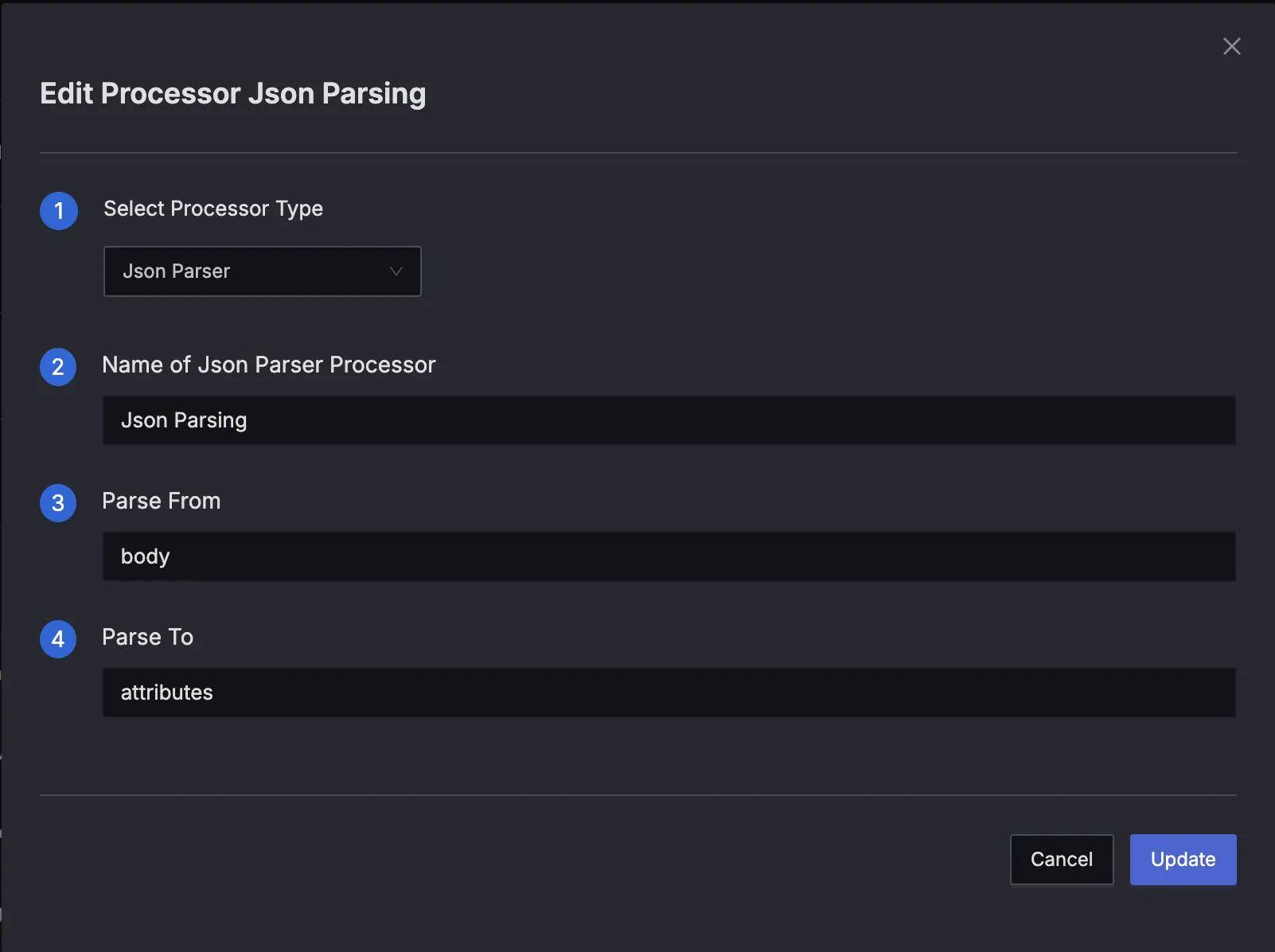
Step 1. JSON Parser – Convert JSON in body to Structured Attributes
The first step is to parse the raw JSON string inside body so we can access its fields directly.
Processor Configuration
- type: json_parser
  name: ParseBodyJson
  parse_from: body
  parse_to: attributes
After Parsing
{
  "body": "{ \"metadata\": { \"container\": { \"group_id\": \"abc123\", \"group_name\": \"backend-service\", \"image_name\": \"backend:v2\" } }, \"message\": \"Request timed out\" }",
  "id": "2wiawVsz48SHom7AJst7GkXjJBb",
  "timestamp": 1746527086483,
  "attributes": {
    "log.file.name": "app.log",
    "message": "Request timed out",
    "metadata": "{\"container\":{\"group_id\":\"abc123\",\"group_name\":\"backend-service\",\"image_name\":\"backend:v2\"}}"
  }
}
Key Observations:
- The
messagefield has been successfully extracted from the body JSON and added as an attribute. - The
metadatafield was not fully parsed into a nested object; instead, it is still a stringified JSON.
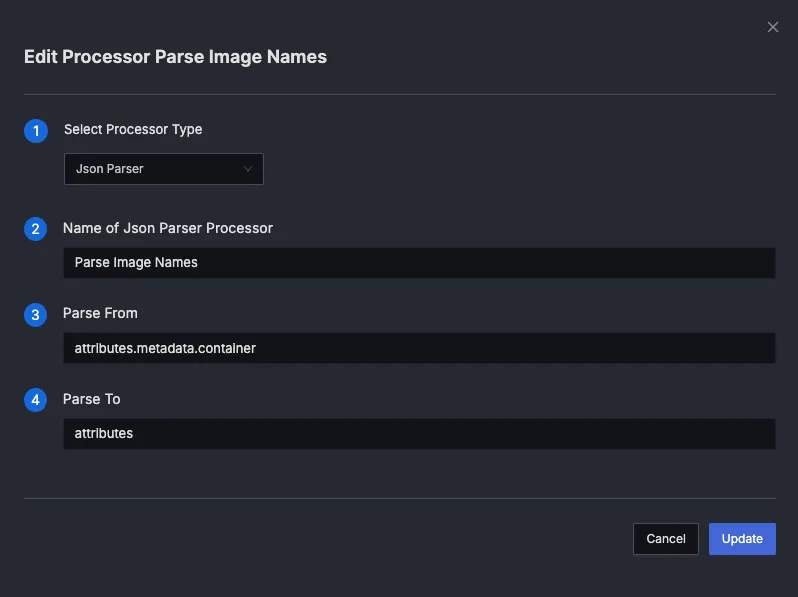
Step 2: Extract Image Name Field
This step uses a json_parser to extract group_id, group_name, and image_name directly under attributes from attributes.metadata.container.
Processor Configuration
- type: json_parser
  name: Parse Image Name
  parse_from: attributes.metadata.container
  parse_to: attributes
Final Output
{
  "body": "{ \"metadata\": { \"container\": { \"group_id\": \"abc123\", \"group_name\": \"backend-service\", \"image_name\": \"backend:v2\" } }, \"message\": \"Request timed out\" }",
  "id": "2wiawVsz48SHom7AJst7GkXjJBb",
  "timestamp": 1746527086483,
  "attributes": {
    "container": "{\"group_id\":\"abc123\",\"group_name\":\"backend-service\",\"image_name\":\"backend:v2\"}",
    "group_id": "abc123",
    "group_name": "backend-service",
    "image_name": "backend:v2",
    "log.file.name": "app.log",
    "message": "Request timed out",
    "metadata": "{  \"container\": {    \"group_id\": \"abc123\",    \"group_name\": \"backend-service\",    \"image_name\": \"backend:v2\"  }}"
  }
}
** Key Observations**
group_id,group_name, andimage_namehave been flattened and promoted to top-level fields under attributes.- The original
attributes.containerfield remains as a JSON string, but its contents are now accessible individually.
Optional Refinements
After extracting and flattening nested fields, you may want to remove intermediate fields like metadata and container to reduce noise and log size.
You can use the remove processor to do that.
Remove Metadata
- type: remove
  name: Remove Metadata
  field: attributes.metadata
Remove Container
- type: remove
  name: Remove Container
  field: attributes.container


