Overview
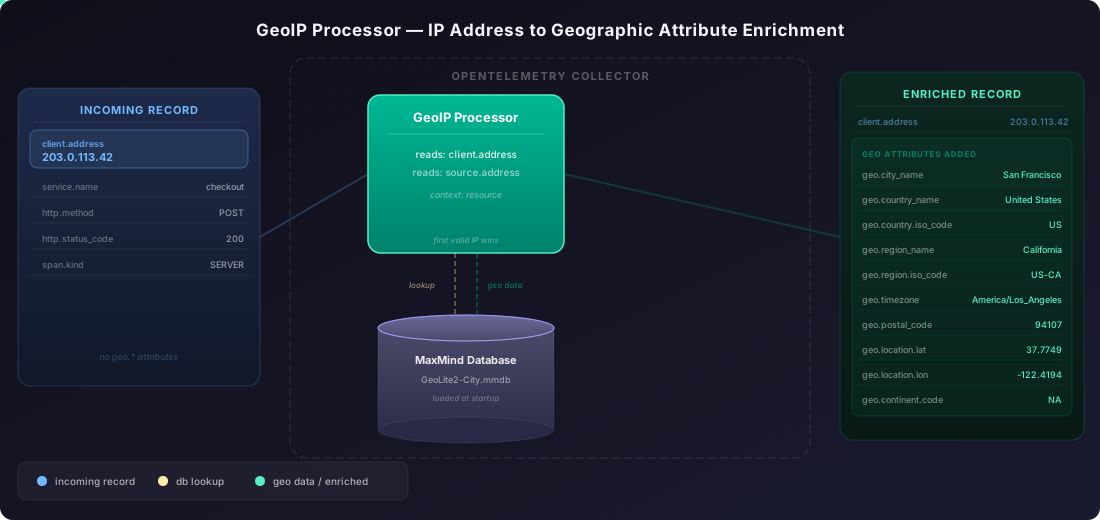
The GeoIP processor reads an IP address from a configured attribute, looks it up in a local MaxMind database, and writes geographic data back as geo.* attributes on the same record. It supports traces, logs, and metrics. Use these attributes for geographic filtering, dashboards, and alerts in SigNoz.
For processor source and changelog, see the geoipprocessor upstream repository.
Prerequisites
-
OpenTelemetry Collector Contrib Distribution: the GeoIP processor ships only in the otelcol-contrib distribution
-
MaxMind City database: the processor requires a local
.mmdbfile. Two options:- GeoLite2-City (free): requires a MaxMind account to download. Use the geoipupdate tool to automate downloads.
- GeoIP2-City (commercial): download from your MaxMind account portal.
Once downloaded, note the absolute path to the
.mmdbfile, you'll need it in the config below.
Configure the processor
Configuration has two parts: adding the geoip processor block with a MaxMind database path, and enabling it in each pipeline where you want enrichment. The diagram below shows how data flows through the processor.
Step 1: Add the processor config
Add the following snippet to your existing otel-collector-config.yaml:
processors:
  geoip:
    providers:
      maxmind:
        database_path: /var/lib/GeoLite2-City.mmdb
    context: record      # optional; default is "resource"
    attributes:          # optional; defaults to [client.address, source.address]
      - client.address
      - source.address
Replace /var/lib/GeoLite2-City.mmdb with the path to your .mmdb file.
For a public IP address like 8.8.8.8, the processor writes geo.city_name, geo.country.iso_code, geo.location.lat, geo.location.lon, and more onto the record.
Key fields
| Field | Default | Description |
|---|---|---|
providers.maxmind.database_path | — | Required. Absolute path to the GeoLite2-City or GeoIP2-City .mmdb file. |
context | resource | Where to read and write attributes. Use resource for resource-level attributes; use record for span, log record, or metric data point attributes. |
attributes | [client.address, source.address] | Ordered list of attribute keys to check for an IP. The processor uses the first key that contains a valid, routable IP address. |
Step 2: Enable in pipelines
Add geoip to the processors list in each pipeline you want to enrich. Place it after memory_limiter and before batch:
service:
  pipelines:
    traces:
      receivers: [otlp]
      processors: [memory_limiter, geoip, batch]
      exporters: [otlp/signoz]
    logs:
      receivers: [otlp]
      processors: [memory_limiter, geoip, batch]
      exporters: [otlp/signoz]
    metrics:
      receivers: [otlp]
      processors: [memory_limiter, geoip, batch]
      exporters: [otlp/signoz]
Attributes added
When a geo lookup succeeds, the processor writes the following attributes. It skips any field the database doesn't have for that IP, so your record won't contain empty strings.
| Attribute | Type | Example |
|---|---|---|
| geo.city_name | string | San Francisco |
| geo.postal_code | string | 94107 |
| geo.country_name | string | United States |
| geo.country.iso_code | string | US |
| geo.continent_name | string | North America |
| geo.continent.code | string | NA |
| geo.region_name | string | California |
| geo.region.iso_code | string | US-CA |
| geo.timezone | string | America/Los_Angeles |
| geo.location.lat | float64 | 37.7749 |
| geo.location.lon | float64 | -122.4194 |
The processor writes geo.location.lat and geo.location.lon together or not at all.
All names are in English. There is no language configuration option.
See the complete configuration
receivers:
  otlp:
    protocols:
      grpc:
      http:

processors:
  memory_limiter:
    check_interval: 1s
    limit_mib: 1000
  geoip:
    providers:
      maxmind:
        database_path: /var/lib/GeoLite2-City.mmdb
    context: record   # use "resource" only if the IP is in a resource attribute
    attributes:
      - client.address
      - source.address
  batch:

exporters:
  otlp/signoz:
    endpoint: "ingest.<region>.signoz.cloud:443"
    tls:
      insecure: false
    headers:
      signoz-ingestion-key: "<your-ingestion-key>"

service:
  pipelines:
    traces:
      receivers: [otlp]
      processors: [memory_limiter, geoip, batch]
      exporters: [otlp/signoz]
    logs:
      receivers: [otlp]
      processors: [memory_limiter, geoip, batch]
      exporters: [otlp/signoz]
    metrics:
      receivers: [otlp]
      processors: [memory_limiter, geoip, batch]
      exporters: [otlp/signoz]
Verify these values:
<region>: Your SigNoz Cloud region<your-ingestion-key>: Your SigNoz ingestion key/var/lib/GeoLite2-City.mmdb: Absolute path to your downloaded GeoLite2-City or GeoIP2-City.mmdbfile.
Validate
Restart your collector after updating the config:
# systemd
sudo systemctl restart otelcol-contrib

# Docker
docker restart <container-name>
Send a trace or log with a known public IP in client.address or source.address. In SigNoz, open the trace or log and check that geo.country.iso_code and related attributes appear on the record.
In the Traces view, select a span and look for geo.* attributes in the span details panel:

In the Logs view, open a log record and confirm the same geo.* attributes are present:

Troubleshooting
Collector fails to start: unsupported geo IP database type
Only GeoLite2-City and GeoIP2-City databases work. GeoLite2-Country, GeoIP2-Country, and ASN databases are not supported. Download a City-type database and update database_path.
Collector fails to start: file not found
The database_path must be an absolute path accessible when the collector starts. Verify:
ls -la /var/lib/GeoLite2-City.mmdbIf running in Docker or Kubernetes, confirm the file is mounted into the container at the same path.
Geo attributes missing from records
Check two things:
- Correct
context: if your IP is in a span attribute, setcontext: record. The defaultresourcecontext reads resource-level attributes only. - Attribute name: confirm the attribute key in your telemetry matches what's in
attributes. Open a trace in SigNoz to inspect actual attribute names.
Geo attributes missing for private IPs
Private and loopback IPs have no entries in commercial geo databases. The processor skips them without logging an error.
Database is stale
The processor loads the .mmdb file once at startup. To update the database, replace the file on disk and restart the collector. Use the geoipupdate tool on a cron schedule to keep the file current.
Next Steps
- Collector configuration reference: review receivers, processors, and exporters.
- Switch to Collector: route application telemetry through a central Collector before adding processors.
- Routing Connector: route telemetry to different destinations by service or attribute.
Get Help
If you need help with the steps in this topic, please reach out to us on SigNoz Community Slack. If you are a SigNoz Cloud user, please use in product chat support located at the bottom right corner of your SigNoz instance or contact us at cloud-support@signoz.io.


