Overview
A common challenge when using a single OpenTelemetry Collector is segregation. If multiple services send telemetry to one Collector, they often share the same ingestion key and backend destination.
The Routing Connector solves this by selectively routing telemetry based on resource attributes (like service.name or tenant.id). This allows you to:
- Use different ingestion keys for different services.
- Send telemetry from specific services to different backends.
- Isolate traffic by environment or team.
For connector basics, see the OpenTelemetry connector documentation.
Set up routing by service
Use this walkthrough to route telemetry from one OTLP receiver to different exporters based on service.name.
In the example below, the routing connector sends payments traffic to one exporter, search traffic to another exporter, and everything else to a default exporter.
We will do this in three steps:
- Add routing rules for each service.
- Add one exporter per destination.
- Connect the incoming and downstream pipelines.
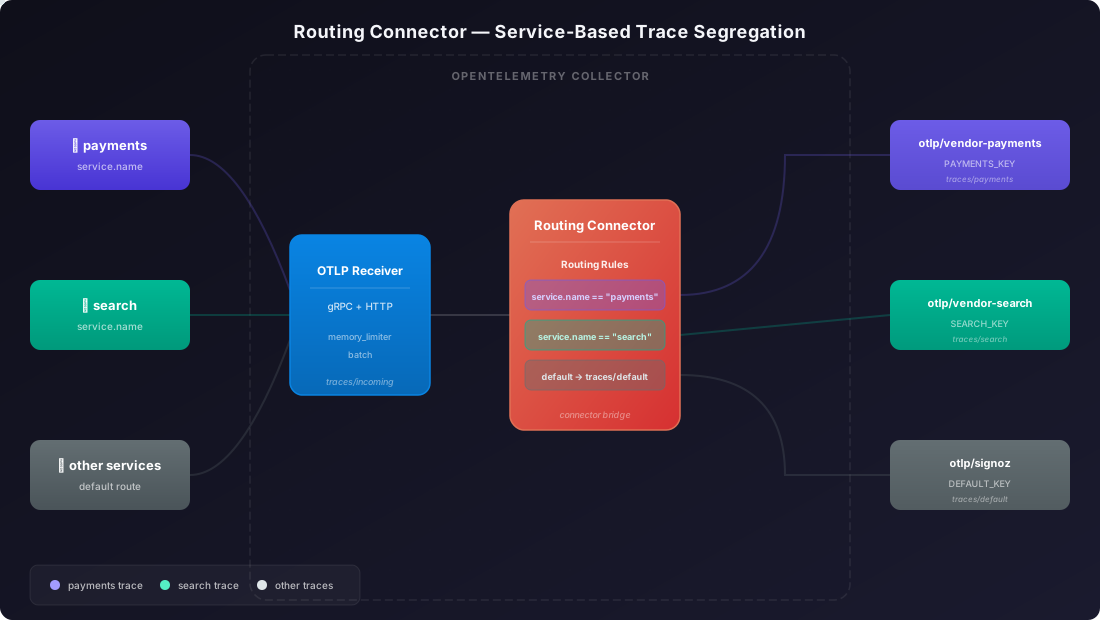
Add the following snippets to your existing otel-collector-config.yaml. This walkthrough assumes your Collector already has receivers and processors configured.
Step 1: Add the routing connector
connectors:
  routing:
    default_pipelines: [traces/default]
    table:
      - context: resource
        statement: resource.attributes["service.name"] == "payments"
        pipelines: [traces/payments]
      - context: resource
        statement: resource.attributes["service.name"] == "search"
        pipelines: [traces/search]
This connector reads resource.attributes["service.name"] and maps matching telemetry to a pipeline:
paymentsgoes totraces/paymentssearchgoes totraces/search- anything else goes to
traces/default
Here is what the main routing fields mean:
table: the list of routing rules the connector checks.context: where the connector should look for fields. Useresourcewhen you want to match resource attributes such asservice.name.statement: the OTTL expression that decides whether a rule matches.pipelines: the destination pipeline to use when the rule matches.default_pipelines: the fallback pipeline to use when no rule matches.
Step 2: Add the exporters
You can point each exporter to a different SigNoz account, ingestion key, or backend destination.
exporters:
  otlp/signoz:
    endpoint: "ingest.<region>.signoz.cloud:443"
    headers:
      signoz-ingestion-key: "<default-ingestion-key>"

  otlp/vendor-payments:
    endpoint: "ingest.<region>.signoz.cloud:443"
    headers:
      signoz-ingestion-key: "<payments-ingestion-key>"

  otlp/vendor-search:
    endpoint: "ingest.<region>.signoz.cloud:443"
    headers:
      signoz-ingestion-key: "<search-ingestion-key>"
Verify these values:
<region>: Your SigNoz Cloud region<default-ingestion-key>,<payments-ingestion-key>,<search-ingestion-key>: SigNoz ingestion keys for each destination
Step 3: Connect the pipelines
service:
  pipelines:
    traces/incoming:
      receivers: [otlp]
      processors: [memory_limiter, batch]
      exporters: [routing]
    traces/payments:
      receivers: [routing]
      exporters: [otlp/vendor-payments]
    traces/search:
      receivers: [routing]
      exporters: [otlp/vendor-search]
    traces/default:
      receivers: [routing]
      exporters: [otlp/signoz]
A connector appears as an exporter in the upstream pipeline and as a receiver in each downstream pipeline. This is how the Collector bridges pipelines together.
The traces/incoming pipeline receives all OTLP traffic and sends it to the routing connector. Each downstream pipeline then receives only the telemetry that matches its rule and exports it with its own exporter.
See the complete configuration
receivers:
  otlp:
    protocols:
      grpc:
      http:

connectors:
  routing:
    default_pipelines: [traces/default]
    table:
      - context: resource
        statement: resource.attributes["service.name"] == "payments"
        pipelines: [traces/payments]
      - context: resource
        statement: resource.attributes["service.name"] == "search"
        pipelines: [traces/search]

exporters:
  otlp/signoz:
    endpoint: "ingest.<region>.signoz.cloud:443"
    headers:
      signoz-ingestion-key: "<default-ingestion-key>"

  otlp/vendor-payments:
    endpoint: "ingest.<region>.signoz.cloud:443"
    headers:
      signoz-ingestion-key: "<payments-ingestion-key>"

  otlp/vendor-search:
    endpoint: "ingest.<region>.signoz.cloud:443"
    headers:
      signoz-ingestion-key: "<search-ingestion-key>"

service:
  pipelines:
    traces/incoming:
      receivers: [otlp]
      processors: [memory_limiter, batch]
      exporters: [routing]
    traces/payments:
      receivers: [routing]
      exporters: [otlp/vendor-payments]
    traces/search:
      receivers: [routing]
      exporters: [otlp/vendor-search]
    traces/default:
      receivers: [routing]
      exporters: [otlp/signoz]
Troubleshooting
Wrong OTTL context
Use context: resource for resource attributes such as service.name. Use context: span for span fields like status.code.
Missing default_pipelines
If nothing matches and default_pipelines is missing, unmatched telemetry is dropped. Always include a default pipeline unless you intentionally want to drop data.
Next Steps
- Collector configuration reference — Review receivers, processors, and exporters.
- Switch to Collector — Move apps to a central Collector before you add routing.
Get Help
If you need help with the steps in this topic, please reach out to us on SigNoz Community Slack.
If you are a SigNoz Cloud user, please use in product chat support located at the bottom right corner of your SigNoz instance or contact us at cloud-support@signoz.io.


