Overview
The signoz-metrics-adapter is a community-built Kubernetes custom metrics adapter. It queries SigNoz and exposes the results through the Kubernetes Custom Metrics API (custom.metrics.k8s.io). The Horizontal Pod Autoscaler (HPA) can then scale workloads based on metrics in SigNoz.
This tutorial walks through deploying the adapter and wiring up an HPA to a SigNoz metric.
Prerequisites
- A Kubernetes cluster with
kubectlaccess - Helm 3 installed
- SigNoz Cloud or Self-Hosted with at least one metric ingested, and a service account API key
- Your pods must send metrics to SigNoz with
k8s.pod.nameset as a resource attribute- The SigNoz k8s-infra Helm chart handles this automatically via an OTel Collector with Kubernetes resource detection
- For custom app metrics, configure your OTel SDK or Collector to include
k8s.pod.nameas a resource attribute. See Setting resource attributes
Architecture
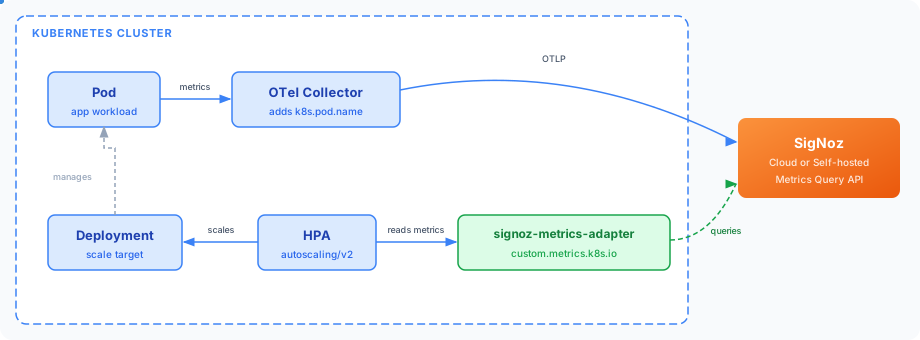
Your pods emit metrics to SigNoz via an OTel Collector. The collector enriches each metric with the k8s.pod.name resource attribute. The adapter queries SigNoz for those metrics and serves the values through the Kubernetes Custom Metrics API (custom.metrics.k8s.io). The HPA reads from that API and scales your Deployment up or down based on the configured target value.
Steps
Step 1: Clone the adapter repository
The adapter is deployed using its Helm chart, which is included in the repository.
git clone https://github.com/brainpodnl/signoz-metrics-adapter.git
cd signoz-metrics-adapter
Step 2: Create the SigNoz credentials secret
The adapter reads your SigNoz URL and API key from a Kubernetes secret. Create the namespace and secret before deploying:
kubectl create namespace signoz-metric-adapter

kubectl create secret generic signoz-credentials \
  --namespace signoz-metric-adapter \
  --from-literal=url=<your-signoz-url> \
  --from-literal=token=<your-api-key>
Verify these values:
<your-signoz-url>: your SigNoz Cloud instance URL, for example:https://<your-instance>.signoz.cloud<your-api-key>: a service account API key with theSigNoz-Viewerrole
Step 3: Configure the adapter
Create a my-values.yaml file. The pre-built image is public, so set imagePullSecrets to an empty list. Add the SigNoz metrics you want the HPA to use:
imagePullSecrets: []

signoz:
  existingSecret: "signoz-credentials"
  secretKeys:
    url: url
    token: token
  timeRangeMinutes: 5
  metrics:
    - <your-metric-name>
Key fields:
| Field | Description |
|---|---|
metrics | List of SigNoz metric names to expose to the HPA |
timeRangeMinutes | Lookback window the adapter uses when querying SigNoz (default: 5) |
filterExpression | Optional SigNoz filter expression to scope metric values. Example: deployment.environment = 'prod' |
To find available metric names, open Metrics Explorer in SigNoz.
Step 4: Deploy the adapter
The adapter image is published to GHCR. The command below uses the latest known tag. Check the GHCR package page and update the tag if a newer version is available:
helm upgrade --install signoz-metrics-adapter helm/ \
  --namespace signoz-metric-adapter \
  --values my-values.yaml \
  --set steiger.adapter.image=ghcr.io/brainpodnl/signoz-metrics-adapter/adapter:0789de
Verify the adapter pod is running:
kubectl get pods --namespace signoz-metric-adapterThe adapter pod shows Running.
Step 5: Configure the HPA
Create an HPA that scales your workload based on a metric exposed by the adapter:
apiVersion: autoscaling/v2
kind: HorizontalPodAutoscaler
metadata:
  name: my-app-hpa
  namespace: <your-namespace>
spec:
  scaleTargetRef:
    apiVersion: apps/v1
    kind: Deployment
    name: my-app
  minReplicas: 1
  maxReplicas: 10
  metrics:
    - type: Pods
      pods:
        metric:
          name: <your-metric-name>
        target:
          type: AverageValue
          averageValue: "100"
Verify these values:
<your-namespace>: the namespace where your Deployment runsmy-app: the name of your Deployment<your-metric-name>: the metric name you added tomy-values.yaml"100": the target average value per replica at which the HPA scales
Apply the HPA:
kubectl apply -f hpa.yamlValidate
Check that the HPA is reading metric values from the adapter:
kubectl describe hpa my-app-hpa -n <your-namespace>Look for:
pods/<your-metric-name>: <current-value> / 100Any numeric value, including 0, confirms end-to-end connectivity between the HPA, adapter, and SigNoz. A value of <unknown> or an API error means the custom metric path is not working yet.
Query the Custom Metrics API directly to verify:
kubectl get --raw "/apis/custom.metrics.k8s.io/v1beta2/namespaces/<your-namespace>/pods/*/<your-metric-name>"Troubleshooting
Adapter pod is not running
Check adapter logs for connection errors:
kubectl logs -n signoz-metric-adapter -l app.kubernetes.io/name=signoz-metrics-adapterCommon causes:
- Secret name or key mismatch — verify the secret name and keys match
my-values.yaml - Unreachable SigNoz URL — confirm the adapter can reach your SigNoz host from inside the cluster
HPA shows <unknown> for metric value
- Confirm the metric name in the HPA spec matches exactly what is in
signoz.metricsinmy-values.yaml - Confirm the metric has recent data in SigNoz. Open Metrics Explorer and check that the metric has data within the last
timeRangeMinuteswindow - Confirm the APIService is registered and available:
kubectl get apiservice v1beta2.custom.metrics.k8s.ioThe AVAILABLE column should show True.
Metric returns empty results
The adapter groups values by k8s.pod.name. Pods without that resource attribute return empty results. Check Metrics Explorer and filter by k8s.pod.name to confirm the attribute is present.
Filter expression returns no data
Test your filter expression in Metrics Explorer before adding it to the adapter config. Use SigNoz query filter syntax.
Next Steps
- Build a dashboard to visualize the metrics you are scaling on
- Create alerts on the same metrics to get notified when scaling events occur
- Open Metrics Explorer in SigNoz to discover additional metrics you can expose through the adapter
Get Help
If you need help with the steps in this topic, please reach out to us on SigNoz Community Slack. If you are a SigNoz Cloud user, please use in product chat support located at the bottom right corner of your SigNoz instance or contact us at cloud-support@signoz.io.


