


Overview
This guide walks you through setting up monitoring and observability for Baseten using OpenTelemetry and exporting traces, logs, and metrics to SigNoz. With this integration, you can observe and track various metrics for your Baseten applications and LLM usage.
Monitoring Baseten in your AI applications with telemetry ensures full observability across your AI and LLM workflows. By leveraging SigNoz, you can analyze correlated traces, logs, and metrics in unified dashboards, configure alerts, and gain actionable insights to continuously improve reliability, responsiveness, and user experience.
Prerequisites
- A SigNoz Cloud account with an active ingestion key or Self Hosted SigNoz instance
- For Python:
pipinstalled for managing Python packages - A Baseten account and API key. You can get the API key from Baseten API Keys page
Monitoring Baseten
For more information on getting started with Baseten in your Python environment, refer to the Baseten quickstart guide.
No code auto-instrumentation is recommended for quick setup with minimal code changes. It's ideal when you want to get observability up and running without modifying your application code and are leveraging standard instrumentor libraries.
Step 1: Install the necessary packages in your Python environment.
pip install \
  opentelemetry-distro \
  opentelemetry-exporter-otlp \
  httpx \
  opentelemetry-instrumentation-httpx \
  opentelemetry-instrumentation-system-metrics \
  openai \
  opentelemetry-instrumentation-openai-v2
Step 2: Add Automatic Instrumentation
opentelemetry-bootstrap --action=install
Step 3: Configure logging level
To ensure logs are properly captured and exported, configure the root logger to emit logs at the DEBUG level or higher:
import logging

logging.getLogger().setLevel(logging.DEBUG)
logging.getLogger("httpx").setLevel(logging.DEBUG)
This sets the minimum log level for the root logger to DEBUG, which ensures that logger.debug() calls and higher severity logs (INFO, WARNING, ERROR, CRITICAL) are captured by the OpenTelemetry logging auto-instrumentation and sent to SigNoz.
Step 4: Create an example Baseten application
from openai import OpenAI
import os
import logging

logging.getLogger().setLevel(logging.DEBUG)
logging.getLogger("httpx").setLevel(logging.DEBUG)


client = OpenAI(
    base_url="https://inference.baseten.co/v1",
    api_key=os.environ["BASETEN_API_KEY"],
)

try:
    response = client.chat.completions.create(
        model="nvidia/Nemotron-120B-A12B",
        messages=[
            {"role": "user", "content": "What is SigNoz?"},
        ],
    )
    print(response.choices[0].message.content)
except Exception as e:
    print(f"Error type: {type(e).__name__}")
    print(f"Error message: {str(e)}")
    if hasattr(e, 'response'):
        print(f"Response status: {e.response.status_code if hasattr(e.response, 'status_code') else 'N/A'}")
        print(f"Response body: {e.response.text if hasattr(e.response, 'text') else 'N/A'}")
    raise
Before running this code, ensure that you have set the environment variable BASETEN_API_KEY with your generated Baseten API key.
Step 5: Run your application with auto-instrumentation
Run your application with the following environment variables set. This configures OpenTelemetry to export traces, logs, and metrics to SigNoz Cloud and enables automatic log correlation:
OTEL_RESOURCE_ATTRIBUTES="service.name=<service_name>" \
OTEL_EXPORTER_OTLP_ENDPOINT="https://ingest.<region>.signoz.cloud:443" \
OTEL_EXPORTER_OTLP_HEADERS="signoz-ingestion-key=<your-ingestion-key>" \
OTEL_EXPORTER_OTLP_PROTOCOL=grpc \
OTEL_TRACES_EXPORTER=otlp \
OTEL_METRICS_EXPORTER=otlp \
OTEL_LOGS_EXPORTER=otlp \
OTEL_PYTHON_LOG_CORRELATION=true \
OTEL_PYTHON_LOGGING_AUTO_INSTRUMENTATION_ENABLED=true \
opentelemetry-instrument <your_run_command>
<service_name>is the name of your service<region>: Your SigNoz Cloud region<your-ingestion-key>: Your SigNoz ingestion key- Replace
<your_run_command>with the actual command you would use to run your application. In this case we would use:python main.py
Code-based manual instrumentation gives you fine-grained control over your telemetry configuration. Use this approach when you need to customize resource attributes, sampling strategies, or integrate with existing observability infrastructure.
Step 1: Install additional OpenTelemetry dependencies
pip install \
  opentelemetry-api \
  opentelemetry-sdk \
  opentelemetry-exporter-otlp \
  opentelemetry-instrumentation-httpx \
  opentelemetry-instrumentation-system-metrics \
  openai \
  opentelemetry-instrumentation-openai-v2
Step 2: Set up Traces
from opentelemetry.sdk.resources import Resource
from opentelemetry.sdk.trace import TracerProvider
from opentelemetry.sdk.trace.export import BatchSpanProcessor
from opentelemetry.exporter.otlp.proto.http.trace_exporter import OTLPSpanExporter
from opentelemetry import trace
from opentelemetry.instrumentation.openai_v2 import OpenAIInstrumentor
import os


resource = Resource.create({"service.name": "<service_name>"})
provider = TracerProvider(resource=resource)
span_exporter = OTLPSpanExporter(
    endpoint=os.getenv("OTEL_EXPORTER_TRACES_ENDPOINT"),
    headers={"signoz-ingestion-key": os.getenv("SIGNOZ_INGESTION_KEY")},
)
processor = BatchSpanProcessor(span_exporter)
provider.add_span_processor(processor)
trace.set_tracer_provider(provider)

OpenAIInstrumentor().instrument()
<service_name>is the name of your serviceOTEL_EXPORTER_TRACES_ENDPOINT→ SigNoz Cloud trace endpoint with appropriate region:https://ingest.<region>.signoz.cloud:443/v1/tracesSIGNOZ_INGESTION_KEY→ Your SigNoz ingestion key
Step 3: Set up Metrics
from opentelemetry.sdk.resources import Resource
from opentelemetry.sdk.metrics import MeterProvider
from opentelemetry.exporter.otlp.proto.http.metric_exporter import OTLPMetricExporter
from opentelemetry.sdk.metrics.export import PeriodicExportingMetricReader
from opentelemetry import metrics
from opentelemetry.instrumentation.system_metrics import SystemMetricsInstrumentor
from opentelemetry.instrumentation.httpx import HTTPXClientInstrumentor
import os

resource = Resource.create({"service.name": "<service_name>"})
metric_exporter = OTLPMetricExporter(
    endpoint=os.getenv("OTEL_EXPORTER_METRICS_ENDPOINT"),
    headers={"signoz-ingestion-key": os.getenv("SIGNOZ_INGESTION_KEY")},
)
reader = PeriodicExportingMetricReader(metric_exporter)
metric_provider = MeterProvider(metric_readers=[reader], resource=resource)
metrics.set_meter_provider(metric_provider)

meter = metrics.get_meter(__name__)

# turn on out-of-the-box metrics
SystemMetricsInstrumentor().instrument()
HTTPXClientInstrumentor().instrument()
<service_name>is the name of your serviceOTEL_EXPORTER_METRICS_ENDPOINT→ SigNoz Cloud endpoint with appropriate region:https://ingest.<region>.signoz.cloud:443/v1/metricsSIGNOZ_INGESTION_KEY→ Your SigNoz ingestion key
SystemMetricsInstrumentor provides system metrics (CPU, memory, etc.), and HTTPXClientInstrumentor provides outbound HTTP request metrics such as request duration. If you want to add custom metrics to your Baseten application, see Python Custom Metrics.
Step 4: Set up Logs
import logging
from opentelemetry.sdk.resources import Resource
from opentelemetry._logs import set_logger_provider
from opentelemetry.sdk._logs import LoggerProvider, LoggingHandler
from opentelemetry.sdk._logs.export import BatchLogRecordProcessor
from opentelemetry.exporter.otlp.proto.http._log_exporter import OTLPLogExporter
import os

resource = Resource.create({"service.name": "<service_name>"})
logger_provider = LoggerProvider(resource=resource)
set_logger_provider(logger_provider)

otlp_log_exporter = OTLPLogExporter(
    endpoint=os.getenv("OTEL_EXPORTER_LOGS_ENDPOINT"),
    headers={"signoz-ingestion-key": os.getenv("SIGNOZ_INGESTION_KEY")},
)
logger_provider.add_log_record_processor(
    BatchLogRecordProcessor(otlp_log_exporter)
)
# Attach OTel logging handler to root logger
handler = LoggingHandler(level=logging.INFO, logger_provider=logger_provider)
logging.basicConfig(level=logging.INFO, handlers=[handler])

logger = logging.getLogger(__name__)

# Enable httpx logging to capture HTTP requests
httpx_logger = logging.getLogger("httpx")
httpx_logger.setLevel(logging.DEBUG)
httpx_logger.addHandler(handler)
<service_name>is the name of your serviceOTEL_EXPORTER_LOGS_ENDPOINT→ SigNoz Cloud endpoint with appropriate region:https://ingest.<region>.signoz.cloud:443/v1/logsSIGNOZ_INGESTION_KEY→ Your SigNoz ingestion key
Step 5: Run an example Baseten application
Ensure you have completed the steps above (traces, logs, and metrics configuration) before running this code. All OpenTelemetry instrumentation must be initialized first.
from openai import OpenAI
import os
import logging

logging.getLogger().setLevel(logging.DEBUG)
logging.getLogger("httpx").setLevel(logging.DEBUG)


client = OpenAI(
    base_url="https://inference.baseten.co/v1",
    api_key=os.environ["BASETEN_API_KEY"],
)

try:
    response = client.chat.completions.create(
        model="nvidia/Nemotron-120B-A12B",
        messages=[
            {"role": "user", "content": "What is SigNoz?"},
        ],
    )
    print(response.choices[0].message.content)
except Exception as e:
    print(f"Error type: {type(e).__name__}")
    print(f"Error message: {str(e)}")
    if hasattr(e, 'response'):
        print(f"Response status: {e.response.status_code if hasattr(e.response, 'status_code') else 'N/A'}")
        print(f"Response body: {e.response.text if hasattr(e.response, 'text') else 'N/A'}")
    raise
Before running this code, ensure that you have set the environment variable BASETEN_API_KEY with your generated Baseten API key.
View Traces, Logs, and Metrics in SigNoz
Your Baseten LLM usage should now automatically emit traces, logs, and metrics.
You should be able to view traces in SigNoz Cloud under the traces tab:

When you click on a trace in SigNoz, you'll see a detailed view of the trace, including all associated spans, along with their events and attributes.

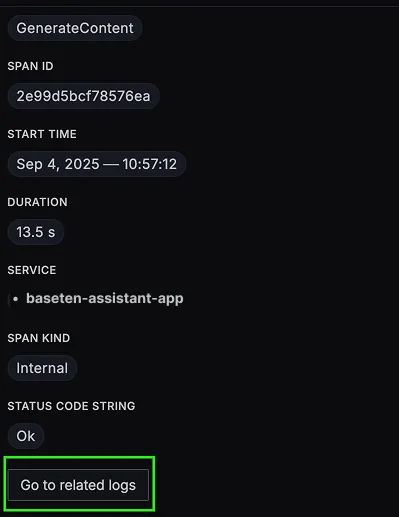
You should be able to view logs in SigNoz Cloud under the logs tab. You can also view logs by clicking on the "Related Logs" button in the trace view to see correlated logs:

When you click on any of these logs in SigNoz, you'll see a detailed view of the log, including attributes:

You should be able to see Baseten related metrics in SigNoz Cloud under the metrics tab:

When you click on any of these metrics in SigNoz, you'll see a detailed view of the metric, including attributes:

Troubleshooting
If you don't see your telemetry data:
- Verify network connectivity - Ensure your application can reach SigNoz Cloud endpoints
- Check ingestion key - Verify your SigNoz ingestion key is correct
- Wait for data - OpenTelemetry batches data before sending, so wait 10-30 seconds after making API calls
- Try a console exporter — Enable a console exporter locally to confirm that your application is generating telemetry data before it’s sent to SigNoz
Next Steps
You can also check out our custom Baseten dashboard here which provides specialized visualizations for monitoring your Baseten usage in applications. The dashboard includes pre-built charts specifically tailored for LLM usage, along with import instructions to get started quickly.

Setup OpenTelemetry Collector (Optional)
What is the OpenTelemetry Collector?
Think of the OTel Collector as a middleman between your app and SigNoz. Instead of your application sending data directly to SigNoz, it sends everything to the Collector first, which then forwards it along.
Why use it?
- Cleaning up data — Filter out noisy traces you don't care about, or remove sensitive info before it leaves your servers.
- Keeping your app lightweight — Let the Collector handle batching, retries, and compression instead of your application code.
- Adding context automatically — The Collector can tag your data with useful info like which Kubernetes pod or cloud region it came from.
- Future flexibility — Want to send data to multiple backends later? The Collector makes that easy without changing your app.
See Switch from direct export to Collector for step-by-step instructions to convert your setup.
For more details, see Why use the OpenTelemetry Collector? and the Collector configuration guide.
Additional resources:
- Set up alerts for high latency or error rates
- Learn more about querying traces
- Explore log correlation