This guide shows how to instrument a Temporal Go application with OpenTelemetry and send traces, metrics, and logs to SigNoz.
For an overview of Temporal and its architecture, see the Temporal overview.
Prerequisites
- Go 1.21+
- A running Temporal server (local or Temporal Cloud)
- A SigNoz Cloud account (sign up here) or self-hosted SigNoz
Sample Application
We've published a complete example application at GitHub. Follow along with the code as you work through this guide.
Architecture Overview
Here's how OpenTelemetry integrates with your Temporal application:
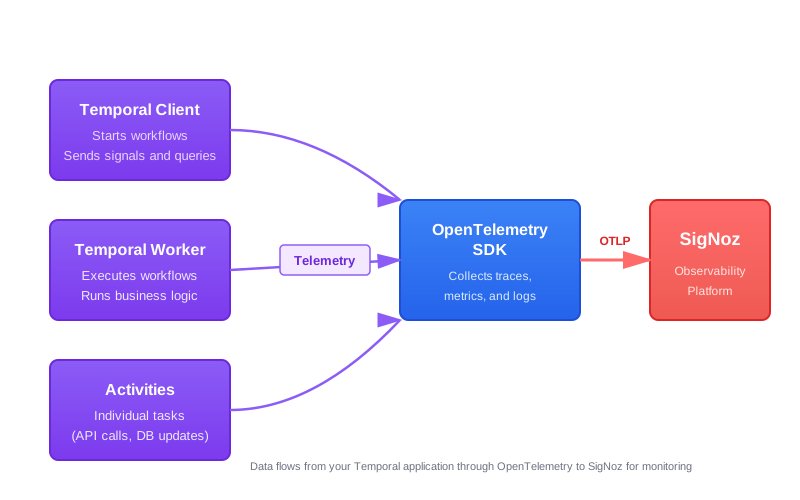
Each component (client, worker, workflows, activities) gets instrumented to capture traces, metrics, and logs.
Setup
Step 1: Add Dependencies
go get go.temporal.io/sdk@latest
go get go.temporal.io/sdk/contrib/opentelemetry@latest
go get go.temporal.io/sdk/contrib/envconfig@latest
go get go.opentelemetry.io/otel@latest
go get go.opentelemetry.io/otel/sdk@latest
go get go.opentelemetry.io/otel/exporters/otlp/otlptrace/otlptracegrpc@latest
go get go.opentelemetry.io/otel/sdk/metric@latest
go get go.opentelemetry.io/otel/exporters/otlp/otlpmetric/otlpmetricgrpc@latest
go get go.opentelemetry.io/otel/sdk/log@latest
go get go.opentelemetry.io/otel/exporters/otlp/otlplog/otlploggrpc@latest
go get go.opentelemetry.io/contrib/bridges/otelslog@latestStep 2: Configure OpenTelemetry Providers
Create telemetry/setup.go to initialize trace, metric, and log providers. All three exporters read their endpoint and auth headers from standard OTel environment variables, so no credentials appear in code.
package telemetry

import (
	"context"
	"fmt"

	"go.opentelemetry.io/otel"
	"go.opentelemetry.io/otel/exporters/otlp/otlplog/otlploggrpc"
	"go.opentelemetry.io/otel/exporters/otlp/otlpmetric/otlpmetricgrpc"
	"go.opentelemetry.io/otel/exporters/otlp/otlptrace/otlptracegrpc"
	"go.opentelemetry.io/otel/log/global"
	"go.opentelemetry.io/otel/propagation"
	sdklog "go.opentelemetry.io/otel/sdk/log"
	sdkmetric "go.opentelemetry.io/otel/sdk/metric"
	"go.opentelemetry.io/otel/sdk/resource"
	sdktrace "go.opentelemetry.io/otel/sdk/trace"
	semconv "go.opentelemetry.io/otel/semconv/v1.26.0"
)

// InitProviders initializes OTel trace, metric, and log providers.
// Call the returned shutdown function before your process exits to flush buffered telemetry.
func InitProviders(ctx context.Context) (shutdown func(context.Context) error, err error) {
	res, err := resource.New(ctx,
		resource.WithAttributes(
			semconv.ServiceName("temporal-go-app"),
		),
		resource.WithFromEnv(),
		resource.WithTelemetrySDK(),
		resource.WithProcess(),
		resource.WithHost(),
	)
	if err != nil {
		return nil, fmt.Errorf("resource: %w", err)
	}

	// Traces
	traceExp, err := otlptracegrpc.New(ctx)
	if err != nil {
		return nil, fmt.Errorf("trace exporter: %w", err)
	}
	tp := sdktrace.NewTracerProvider(
		sdktrace.WithBatcher(traceExp),
		sdktrace.WithResource(res),
	)
	otel.SetTracerProvider(tp)
	otel.SetTextMapPropagator(propagation.NewCompositeTextMapPropagator(
		propagation.TraceContext{},
		propagation.Baggage{},
	))

	// Metrics
	metricExp, err := otlpmetricgrpc.New(ctx)
	if err != nil {
		return nil, fmt.Errorf("metric exporter: %w", err)
	}
	mp := sdkmetric.NewMeterProvider(
		sdkmetric.WithReader(sdkmetric.NewPeriodicReader(metricExp)),
		sdkmetric.WithResource(res),
	)
	otel.SetMeterProvider(mp)

	// Logs
	logExp, err := otlploggrpc.New(ctx)
	if err != nil {
		return nil, fmt.Errorf("log exporter: %w", err)
	}
	lp := sdklog.NewLoggerProvider(
		sdklog.WithProcessor(sdklog.NewBatchProcessor(logExp)),
		sdklog.WithResource(res),
	)
	global.SetLoggerProvider(lp)

	shutdown = func(ctx context.Context) error {
		if err := tp.Shutdown(ctx); err != nil {
			return err
		}
		if err := mp.Shutdown(ctx); err != nil {
			return err
		}
		return lp.Shutdown(ctx)
	}
	return shutdown, nil
}
What this does
- Sets a default service name of
temporal-go-app;resource.WithFromEnv()overwrites it whenOTEL_SERVICE_NAMEis set, and also picks upOTEL_RESOURCE_ATTRIBUTES WithTelemetrySDK(),WithProcess(), andWithHost()add SDK version, process, and host attributes to every signal- Creates OTLP/gRPC exporters for traces, metrics, and logs —
OTEL_EXPORTER_OTLP_ENDPOINTandOTEL_EXPORTER_OTLP_HEADERSare read automatically by the exporters - Sets global OTel providers so all instrumentation in the process picks them up
- Returns a
shutdownfunction — call it withdeferto flush all buffered data before exit
Step 3: Configure Temporal Connection
Create config/config.go to handle Temporal connection options. Without TEMPORAL_PROFILE set it connects to localhost:7233 (local dev server). With TEMPORAL_PROFILE=cloud it loads address, namespace, and TLS settings from ~/.config/temporalio/temporal.toml.
package config

import (
	"fmt"
	"os"
	"path/filepath"

	"go.temporal.io/sdk/client"
	"go.temporal.io/sdk/contrib/envconfig"
)

// CreateClientOptions returns Temporal client options.
// If TEMPORAL_PROFILE is set, it loads connection settings (address, namespace, TLS)
// from the profile in ~/.config/temporalio/temporal.toml.
// Otherwise it returns empty options, which connect to localhost:7233.
func CreateClientOptions() (client.Options, error) {
	profileName := os.Getenv("TEMPORAL_PROFILE")
	if profileName == "" {
		return client.Options{}, nil
	}

	userDir, err := os.UserConfigDir()
	if err != nil {
		return client.Options{}, fmt.Errorf("failed to get user config dir: %w", err)
	}
	configFilePath := filepath.Join(userDir, "temporalio", "temporal.toml")

	opts, err := envconfig.LoadClientOptions(envconfig.LoadClientOptionsRequest{
		ConfigFilePath:    configFilePath,
		ConfigFileProfile: profileName,
	})
	if err != nil {
		return client.Options{}, fmt.Errorf("failed to load profile %q: %w", profileName, err)
	}

	return opts, nil
}
What this does
- With no
TEMPORAL_PROFILEenv var, returns emptyclient.Options{}— the Temporal SDK defaults tolocalhost:7233 - With
TEMPORAL_PROFILE=cloud(or any profile name), reads connection settings from~/.config/temporalio/temporal.toml— the same config file used by the Temporal CLI - This lets the same binary work for local dev and Temporal Cloud without code changes
Step 4: Instrument the Temporal Worker
package main

import (
	"context"
	"log"
	"log/slog"

	"go.opentelemetry.io/contrib/bridges/otelslog"
	"go.temporal.io/sdk/client"
	temporalotel "go.temporal.io/sdk/contrib/opentelemetry"
	"go.temporal.io/sdk/interceptor"
	"go.temporal.io/sdk/worker"

	"your-module/activities"
	"your-module/config"
	"your-module/telemetry"
	"your-module/workflows"
)

func main() {
	ctx := context.Background()

	shutdown, err := telemetry.InitProviders(ctx)
	if err != nil {
		log.Fatalf("failed to init OTel: %v", err)
	}
	defer shutdown(ctx)

	tracingInterceptor, err := temporalotel.NewTracingInterceptor(temporalotel.TracerOptions{})
	if err != nil {
		log.Fatalf("failed to create tracing interceptor: %v", err)
	}

	metricsHandler := temporalotel.NewMetricsHandler(temporalotel.MetricsHandlerOptions{})

	clientOpts, err := config.CreateClientOptions()
	if err != nil {
		log.Fatalf("failed to create client options: %v", err)
	}
	clientOpts.Interceptors = []interceptor.ClientInterceptor{tracingInterceptor}
	clientOpts.MetricsHandler = metricsHandler

	c, err := client.Dial(clientOpts)
	if err != nil {
		log.Fatalf("failed to create Temporal client: %v", err)
	}
	defer c.Close()

	// Route slog output to SigNoz via OTel log bridge (set after all setup so log.Fatalf above still reaches stderr)
	slog.SetDefault(slog.New(otelslog.NewHandler("temporal-worker")))

	w := worker.New(c, "my-task-queue", worker.Options{
		Interceptors: []interceptor.WorkerInterceptor{tracingInterceptor},
	})
	w.RegisterWorkflow(workflows.MyWorkflow)
	w.RegisterActivity(activities.Greet)

	if err := w.Run(worker.InterruptCh()); err != nil {
		log.Fatalf("worker exited with error: %v", err)
	}
}
What this does
NewTracingInterceptorautomatically traces workflow execution, activity calls, signals, and queries — no manual span creation needed in workflow or activity codeNewMetricsHandlerroutes Temporal's SDK metrics (worker health, task queue lag, workflow and activity durations) into the OTel metric pipelineotelslog.NewHandlerbridges Go's standardslogto the OTel log provider, so everyslog.Infoorslog.Errorcall becomes a structured log record in SigNoz- Both
NewTracingInterceptorandNewMetricsHandleruse the global OTel providers set up intelemetry.InitProviders
Step 5: Instrument the Temporal Client
package main

import (
	"context"
	"log"
	"log/slog"

	"go.opentelemetry.io/contrib/bridges/otelslog"
	"go.temporal.io/sdk/client"
	temporalotel "go.temporal.io/sdk/contrib/opentelemetry"
	"go.temporal.io/sdk/interceptor"

	"your-module/config"
	"your-module/telemetry"
	"your-module/workflows"
)

func main() {
	ctx := context.Background()

	shutdown, err := telemetry.InitProviders(ctx)
	if err != nil {
		log.Fatalf("failed to init OTel: %v", err)
	}
	defer shutdown(ctx)

	tracingInterceptor, err := temporalotel.NewTracingInterceptor(temporalotel.TracerOptions{})
	if err != nil {
		log.Fatalf("failed to create tracing interceptor: %v", err)
	}

	metricsHandler := temporalotel.NewMetricsHandler(temporalotel.MetricsHandlerOptions{})

	clientOpts, err := config.CreateClientOptions()
	if err != nil {
		log.Fatalf("failed to create client options: %v", err)
	}
	clientOpts.Interceptors = []interceptor.ClientInterceptor{tracingInterceptor}
	clientOpts.MetricsHandler = metricsHandler

	c, err := client.Dial(clientOpts)
	if err != nil {
		log.Fatalf("failed to create Temporal client: %v", err)
	}
	defer c.Close()

	// Route slog output to SigNoz via OTel log bridge (set after all setup so log.Fatalf above still reaches stderr)
	slog.SetDefault(slog.New(otelslog.NewHandler("temporal-client")))

	handle, err := c.ExecuteWorkflow(ctx, client.StartWorkflowOptions{
		ID:        "my-workflow-id",
		TaskQueue: "my-task-queue",
	}, workflows.MyWorkflow, "World")
	if err != nil {
		log.Fatalf("failed to start workflow: %v", err)
	}

	slog.Info("workflow started", "workflowID", handle.GetID(), "runID", handle.GetRunID())
}
What this does
- Same interceptor, metrics handler, and connection config as the worker — every
c.ExecuteWorkflowcall produces a trace span linked to the workflow execution config.CreateClientOptions()connects tolocalhost:7233by default, or loads Temporal Cloud settings from~/.config/temporalio/temporal.tomlwhenTEMPORAL_PROFILEis setslog.SetDefaultis called afterclient.Dialso anylog.Fatalfduring setup still writes to stderr rather than silently going to OTeldefer shutdown(ctx)flushes telemetry before the process exits; skipping this drops the last batch of spans
Step 6: Define Workflows and Activities
The tracing interceptor registered in client.Options handles all span creation automatically. Workflow and activity code needs no OTel setup for basic tracing.
package workflows

import (
	"time"

	"go.temporal.io/sdk/workflow"

	"your-module/activities"
)

func MyWorkflow(ctx workflow.Context, name string) (string, error) {
	ctx = workflow.WithActivityOptions(ctx, workflow.ActivityOptions{
		StartToCloseTimeout: 10 * time.Second,
	})

	var result string
	err := workflow.ExecuteActivity(ctx, activities.Greet, name).Get(ctx, &result)
	return result, err
}package activities
import (
"context"
"fmt"
)
func Greet(ctx context.Context, name string) (string, error) {
return fmt.Sprintf("Hello, %s!", name), nil
}What this does
workflow.ExecuteActivitycalls are traced end-to-end — you see the full workflow execution as a distributed trace in SigNoz- To add custom spans inside an activity, use
trace.SpanFromContext(ctx)fromgo.opentelemetry.io/otel/trace
Step 7: Deploy and Run
1. Set environment variables:
export OTEL_SERVICE_NAME="temporal-worker"
export OTEL_EXPORTER_OTLP_ENDPOINT="https://ingest.<region>.signoz.cloud:443"
export OTEL_EXPORTER_OTLP_HEADERS="signoz-ingestion-key=<your-ingestion-key>"
export OTEL_RESOURCE_ATTRIBUTES="deployment.environment=production"
Replace <region> with your SigNoz Cloud region and <your-ingestion-key> with your ingestion key.
2. Start the worker:
go run worker/main.go3. Start the client (in another terminal):
Set OTEL_SERVICE_NAME to temporal-client so it appears as a distinct service in SigNoz:
export OTEL_SERVICE_NAME="temporal-client"
export OTEL_EXPORTER_OTLP_ENDPOINT="https://ingest.<region>.signoz.cloud:443"
export OTEL_EXPORTER_OTLP_HEADERS="signoz-ingestion-key=<your-ingestion-key>"
export OTEL_RESOURCE_ATTRIBUTES="deployment.environment=production"
Then run:
go run starter/main.go1. Create a Secret for the ingestion key:
kubectl create secret generic signoz-secrets \
  --from-literal=OTEL_EXPORTER_OTLP_HEADERS="signoz-ingestion-key=<your-ingestion-key>"
2. Create a ConfigMap for OpenTelemetry settings:
apiVersion: v1
kind: ConfigMap
metadata:
  name: otel-config
data:
  OTEL_EXPORTER_OTLP_ENDPOINT: "https://ingest.<region>.signoz.cloud:443"
  OTEL_RESOURCE_ATTRIBUTES: "deployment.environment=production"
3. Deploy the worker:
apiVersion: apps/v1
kind: Deployment
metadata:
  name: temporal-worker
spec:
  replicas: 1
  selector:
    matchLabels:
      app: temporal-worker
  template:
    metadata:
      labels:
        app: temporal-worker
    spec:
      containers:
        - name: worker
          image: your-registry/temporal-worker:latest
          env:
            - name: OTEL_SERVICE_NAME
              value: "temporal-worker"
            - name: OTEL_EXPORTER_OTLP_ENDPOINT
              valueFrom:
                configMapKeyRef:
                  name: otel-config
                  key: OTEL_EXPORTER_OTLP_ENDPOINT
            - name: OTEL_EXPORTER_OTLP_HEADERS
              valueFrom:
                secretKeyRef:
                  name: signoz-secrets
                  key: OTEL_EXPORTER_OTLP_HEADERS
            - name: OTEL_RESOURCE_ATTRIBUTES
              valueFrom:
                configMapKeyRef:
                  name: otel-config
                  key: OTEL_RESOURCE_ATTRIBUTES
The client starts a workflow and exits, so run it as a Kubernetes Job rather than a Deployment:
apiVersion: batch/v1
kind: Job
metadata:
  name: temporal-client
spec:
  template:
    spec:
      restartPolicy: OnFailure
      containers:
        - name: client
          image: your-registry/temporal-client:latest
          env:
            - name: OTEL_SERVICE_NAME
              value: "temporal-client"
            - name: OTEL_EXPORTER_OTLP_ENDPOINT
              valueFrom:
                configMapKeyRef:
                  name: otel-config
                  key: OTEL_EXPORTER_OTLP_ENDPOINT
            - name: OTEL_EXPORTER_OTLP_HEADERS
              valueFrom:
                secretKeyRef:
                  name: signoz-secrets
                  key: OTEL_EXPORTER_OTLP_HEADERS
            - name: OTEL_RESOURCE_ATTRIBUTES
              valueFrom:
                configMapKeyRef:
                  name: otel-config
                  key: OTEL_RESOURCE_ATTRIBUTES
4. Apply the manifests:
kubectl apply -f otel-configmap.yaml
kubectl apply -f temporal-worker-deployment.yaml
kubectl apply -f temporal-client-job.yaml
Create a docker-compose.yml:
services:
  temporal-worker:
    build: .
    command: ./worker
    environment:
      - OTEL_SERVICE_NAME=temporal-worker
      - OTEL_EXPORTER_OTLP_ENDPOINT=https://ingest.<region>.signoz.cloud:443
      - OTEL_EXPORTER_OTLP_HEADERS=signoz-ingestion-key=<your-ingestion-key>
      - OTEL_RESOURCE_ATTRIBUTES=deployment.environment=production
      - TEMPORAL_ADDRESS=temporal:7233
    depends_on:
      - temporal

  temporal-client:
    build: .
    command: ./starter
    environment:
      - OTEL_SERVICE_NAME=temporal-client
      - OTEL_EXPORTER_OTLP_ENDPOINT=https://ingest.<region>.signoz.cloud:443
      - OTEL_EXPORTER_OTLP_HEADERS=signoz-ingestion-key=<your-ingestion-key>
      - OTEL_RESOURCE_ATTRIBUTES=deployment.environment=production
      - TEMPORAL_ADDRESS=temporal:7233
    depends_on:
      - temporal-worker

  temporal:
    image: temporalio/auto-setup:latest
    ports:
      - "7233:7233"
Create a Dockerfile:
FROM golang:1.23-alpine AS builder
WORKDIR /app
COPY go.* ./
RUN go mod download
COPY . .
RUN go build -o worker ./worker && go build -o starter ./starter

FROM alpine:latest
WORKDIR /app
COPY --from=builder /app/worker ./worker
COPY --from=builder /app/starter ./starter
Run the application:
docker compose up -d1. Set environment variables:
$env:OTEL_SERVICE_NAME="temporal-worker"
$env:OTEL_EXPORTER_OTLP_ENDPOINT="https://ingest.<region>.signoz.cloud:443"
$env:OTEL_EXPORTER_OTLP_HEADERS="signoz-ingestion-key=<your-ingestion-key>"
$env:OTEL_RESOURCE_ATTRIBUTES="deployment.environment=production"
2. Start the worker:
go run worker/main.go3. Start the client (in another PowerShell window):
Set OTEL_SERVICE_NAME to temporal-client so it appears as a distinct service in SigNoz:
$env:OTEL_SERVICE_NAME="temporal-client"
$env:OTEL_EXPORTER_OTLP_ENDPOINT="https://ingest.<region>.signoz.cloud:443"
$env:OTEL_EXPORTER_OTLP_HEADERS="signoz-ingestion-key=<your-ingestion-key>"
$env:OTEL_RESOURCE_ATTRIBUTES="deployment.environment=production"
Then run:
go run starter/main.goValidate in SigNoz
After running your application, verify that data is flowing to SigNoz:
-
View Traces:
- Go to Services and find
temporal-workerandtemporal-client - Click into a service to see traces
- You'll see spans for workflow starts, activity executions, and signals
- Go to Services and find
-
View Metrics:
- Go to Dashboards and import the Temporal SDK Metrics dashboard
- Click Import JSON and paste the dashboard JSON
- View worker health, task queue metrics, and workflow/activity durations
-
View Logs:
- Go to Logs and find logs from your worker and client
- Use the Logs Pipeline feature to parse structured logs:
- Add a JSON parser: JSON parser docs
- Map trace IDs: Trace parser docs
- Map log levels: Severity parser docs


Route Temporal SDK Logs to SigNoz (Optional)
By default, Temporal SDK internal logs (Started Worker, ExecuteActivity, etc.) only appear on stderr. To send them to SigNoz, implement a small adapter that satisfies the go.temporal.io/sdk/log.Logger interface and delegates to slog.
1. Create telemetry/logger.go:
package telemetry

import (
	"log/slog"

	temporallog "go.temporal.io/sdk/log"
)

type SlogTemporalLogger struct {
	l *slog.Logger
}

// NewTemporalLogger wraps a *slog.Logger so it can be set on client.Options.Logger.
func NewTemporalLogger(l *slog.Logger) temporallog.Logger {
	return &SlogTemporalLogger{l: l}
}

func (s *SlogTemporalLogger) Debug(msg string, keyvals ...interface{}) { s.l.Debug(msg, keyvals...) }
func (s *SlogTemporalLogger) Info(msg string, keyvals ...interface{})  { s.l.Info(msg, keyvals...) }
func (s *SlogTemporalLogger) Warn(msg string, keyvals ...interface{})  { s.l.Warn(msg, keyvals...) }
func (s *SlogTemporalLogger) Error(msg string, keyvals ...interface{}) { s.l.Error(msg, keyvals...) }
2. Update worker/main.go and starter/main.go:
Create the OTel logger before configuring client options, set it on clientOpts.Logger, and move slog.SetDefault to after client.Dial:
// Create the OTel-backed logger before client options
otelLogger := slog.New(otelslog.NewHandler("temporal-worker")) // or "temporal-client"

clientOpts.Logger = telemetry.NewTemporalLogger(otelLogger)

c, err := client.Dial(clientOpts)
// ...

// Set as default after Dial so log.Fatalf above still reaches stderr
slog.SetDefault(otelLogger)
With this in place, SDK logs like Started Worker and ExecuteActivity appear in SigNoz as structured DEBUG/INFO records with fields such as WorkflowID, ActivityType, and TaskQueue.
Setup OpenTelemetry Collector (Optional)
What is the OpenTelemetry Collector?
Think of the OTel Collector as a middleman between your app and SigNoz. Instead of your application sending data directly to SigNoz, it sends everything to the Collector first, which then forwards it along.
Why use it?
- Cleaning up data — Filter out noisy traces you don't care about, or remove sensitive info before it leaves your servers.
- Keeping your app lightweight — Let the Collector handle batching, retries, and compression instead of your application code.
- Adding context automatically — The Collector can tag your data with useful info like which Kubernetes pod or cloud region it came from.
- Future flexibility — Want to send data to multiple backends later? The Collector makes that easy without changing your app.
See Switch from direct export to Collector for step-by-step instructions to convert your setup.
For more details, see Why use the OpenTelemetry Collector? and the Collector configuration guide.
Troubleshooting
No data appearing in SigNoz
Symptom: Worker and client run without errors, but no traces or metrics appear in SigNoz.
Causes and fixes:
-
Wrong endpoint or region:
- Verify your endpoint matches your SigNoz region:
https://ingest.<region>.signoz.cloud:443 - Check available regions at SigNoz Cloud endpoints
- Verify your endpoint matches your SigNoz region:
-
Invalid ingestion key:
- Confirm your key at SigNoz ingestion keys page
- Check for typos or extra whitespace in the
OTEL_EXPORTER_OTLP_HEADERSvalue
-
Network or firewall issues:
- Test connectivity:
curl -v https://ingest.<region>.signoz.cloud:443 - Ensure outbound HTTPS (port 443) is allowed
- Test connectivity:
-
Shutdown not called:
- Verify
defer shutdown(ctx)is present in bothworker/main.goandstarter/main.go - Without shutdown, buffered spans and logs are not flushed before the process exits
- Verify
Error: "failed to create trace exporter"
Symptom: Application exits immediately with an error from telemetry.InitProviders.
Cause: The OTLP endpoint is unreachable or misconfigured.
Fix:
- Check that
OTEL_EXPORTER_OTLP_ENDPOINTis set correctly:https://ingest.<region>.signoz.cloud:443 - Test reachability:
curl -v https://ingest.<region>.signoz.cloud:443 - Check if your network requires a proxy and set
HTTPS_PROXYaccordingly
Traces appear but logs don't
Symptom: Traces and metrics work, but logs are missing in SigNoz.
Fix:
- Verify
slog.SetDefault(slog.New(otelslog.NewHandler(...)))runs before anyslog.*calls in application code - Confirm
telemetry.InitProviderscompleted successfully — a failed log provider silently drops log records - Note that startup errors use
log.Fatalf(stdliblogpackage) which writes to stderr, not to SigNoz — this is intentional so errors are always visible in the terminal - Set up a log parsing pipeline in SigNoz (see Validate section above)
High cardinality warning
Symptom: SigNoz shows warnings about high cardinality metrics.
Cause: Temporal emits metrics with labels that include workflow type names, activity type names, and task queue names. In large deployments with many unique values, this creates high cardinality.
Fix: Use an OpenTelemetry Collector with a filter or transform processor to drop or aggregate high-cardinality label values before they reach SigNoz. See Collector configuration guide for details.
Next Steps
- Set up alerts: Create alerts for workflow failures, high activity latency, or worker health issues in SigNoz Alerts
- Build dashboards: Customize the Temporal SDK dashboard or create your own
- Explore traces: Use the Traces Explorer to debug failed workflows
- Query logs: Learn how to search and filter logs in the Logs Explorer documentation
- Monitor activities: Track activity execution times and error rates
Get Help
If you need help with the steps in this topic, please reach out to us on SigNoz Community Slack. If you are a SigNoz Cloud user, please use in product chat support located at the bottom right corner of your SigNoz instance or contact us at cloud-support@signoz.io.


