This guide shows how to instrument a Temporal TypeScript application with OpenTelemetry and send traces, metrics, and logs to SigNoz.
For an overview of Temporal and its architecture, see the Temporal overview.
Prerequisites
- Node.js 18+ and npm/yarn/pnpm installed
- A running Temporal server (local or Temporal Cloud)
- A SigNoz Cloud account (sign up here) or self-hosted SigNoz
Sample Application
We've published a complete example application at GitHub. Follow along with the code as you work through this guide.
Architecture Overview
Here's how OpenTelemetry integrates with your Temporal application:
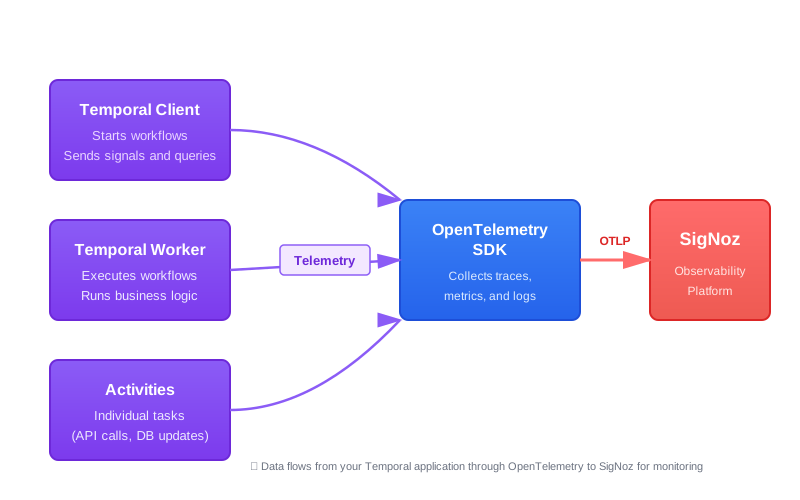
Each component (client, worker, workflows, activities) gets instrumented to capture traces, metrics, and logs.
Setup
Step 1: Add Dependencies
Add OpenTelemetry and Temporal packages to your package.json:
{
  "dependencies": {
    "@opentelemetry/auto-instrumentations-node": "^0.55.0",
    "@opentelemetry/core": "^1.30.0",
    "@opentelemetry/exporter-logs-otlp-grpc": "^0.57.2",
    "@opentelemetry/exporter-metrics-otlp-grpc": "^0.57.2",
    "@opentelemetry/exporter-trace-otlp-grpc": "^0.57.2",
    "@opentelemetry/resources": "^1.30.0",
    "@opentelemetry/sdk-logs": "^0.57.2",
    "@opentelemetry/sdk-metrics": "^1.30.0",
    "@opentelemetry/sdk-node": "^0.57.2",
    "@opentelemetry/sdk-trace-node": "^1.30.0",
    "@opentelemetry/semantic-conventions": "^1.28.0",
    "@opentelemetry/winston-transport": "^0.11.0",
    "@temporalio/activity": "^1.15.0",
    "@temporalio/client": "^1.15.0",
    "@temporalio/envconfig": "^1.15.0",
    "@temporalio/interceptors-opentelemetry": "^1.15.0",
    "@temporalio/worker": "^1.15.0",
    "@temporalio/workflow": "^1.15.0",
    "winston": "^3.17.0"
  }
}
Install the packages:
npm installStep 2: Configure OpenTelemetry SDK
Create src/instrumentation.ts to set up the OpenTelemetry SDK. This file initializes tracing, metrics, and logging for your application.
import { NodeSDK } from '@opentelemetry/sdk-node';
import { OTLPTraceExporter } from '@opentelemetry/exporter-trace-otlp-grpc';
import { OTLPMetricExporter } from '@opentelemetry/exporter-metrics-otlp-grpc';
import { PeriodicExportingMetricReader } from '@opentelemetry/sdk-metrics';
import { getNodeAutoInstrumentations } from '@opentelemetry/auto-instrumentations-node';
import { Resource } from '@opentelemetry/resources';
import { ATTR_SERVICE_NAME } from '@opentelemetry/semantic-conventions';
import { BatchSpanProcessor } from '@opentelemetry/sdk-trace-node';

// Parse authentication headers from environment variables
function parseHeaders(headersString: string | undefined): Record<string, string> {
  if (!headersString) return {};
  const headers: Record<string, string> = {};
  headersString.split(',').forEach((pair) => {
    const [key, value] = pair.split('=');
    if (key && value) headers[key.trim()] = value.trim();
  });
  return headers;
}

export const otlpHeaders = parseHeaders(process.env.OTEL_EXPORTER_OTLP_HEADERS);

// Set up resource with service name
const serviceName = process.env.OTEL_SERVICE_NAME || 'temporal-typescript-app';
export const resource = new Resource({
  [ATTR_SERVICE_NAME]: serviceName,
});

// Configure trace exporter to send traces to SigNoz
const traceExporter = new OTLPTraceExporter({
  headers: otlpHeaders,
  timeoutMillis: 10000,
});

export const spanProcessor = new BatchSpanProcessor(traceExporter);

// Configure metric reader to send metrics to SigNoz
const metricReader = new PeriodicExportingMetricReader({
  exporter: new OTLPMetricExporter({
    headers: otlpHeaders,
    timeoutMillis: 10000,
  }),
});

// Initialize and start the OpenTelemetry SDK
export function setupOtelSdk(): NodeSDK {
  const otelSdk = new NodeSDK({
    resource,
    spanProcessors: [spanProcessor],
    metricReader,
    instrumentations: [getNodeAutoInstrumentations()],
  });

  otelSdk.start();
  console.log('[OpenTelemetry] SDK initialized successfully');
  return otelSdk;
}
What this does
- Reads your SigNoz endpoint and ingestion key from environment variables (
OTEL_EXPORTER_OTLP_ENDPOINT,OTEL_EXPORTER_OTLP_HEADERS) - Sets up trace and metric exporters to send data to SigNoz using OTLP/gRPC
- Enables automatic instrumentation for Node.js libraries (HTTP, DNS, and others)
- Exports
spanProcessorfor use withOpenTelemetryPluginin the worker and client
Step 3: Instrument the Temporal Worker
The Temporal Worker executes workflow and activity code. Configure it to send traces, metrics, and logs to SigNoz.
import { DefaultLogger, Worker, Runtime, makeTelemetryFilterString } from '@temporalio/worker';
import { OpenTelemetryPlugin } from '@temporalio/interceptors-opentelemetry';
import { setupOtelSdk, resource, spanProcessor, otlpHeaders } from './instrumentation';
import * as activities from './activities';

// Configure Temporal's runtime telemetry
function initializeRuntime() {
  Runtime.install({
    logger: new DefaultLogger('WARN'),
    telemetryOptions: {
      metrics: {
        otel: {
          url: process.env.OTEL_EXPORTER_OTLP_ENDPOINT,
          headers: otlpHeaders,
          metricsExportInterval: '1s',
        },
      },
      logging: {
        forward: {},
        filter: makeTelemetryFilterString({ core: 'INFO', other: 'INFO' }),
      },
    },
  });
}

async function run() {
  const otelSdk = setupOtelSdk();
  initializeRuntime();

  // OpenTelemetryPlugin configures interceptors and sinks for tracing
  const plugins = [new OpenTelemetryPlugin({ resource, spanProcessor })];

  try {
    const worker = await Worker.create({
      workflowsPath: require.resolve('./workflows'),
      activities,
      taskQueue: 'my-task-queue',
      plugins,
    });

    await worker.run();
  } finally {
    await otelSdk.shutdown();
  }
}

run().catch(console.error);
What this does
Runtime.install()sends Temporal's internal metrics (worker health, task queue lag) to SigNozOpenTelemetryPluginautomatically configures interceptors and sinks for tracing workflow, activity, and client calls- The
metricsExportInterval: '1s'setting ensures metrics reach SigNoz quickly during development makeTelemetryFilterStringcontrols the log level for Temporal's native runtime logs
Step 4: Instrument the Temporal Client
The Temporal Client starts workflows and queries their status.
import { setupOtelSdk, resource, spanProcessor } from './instrumentation';
import { Connection, Client } from '@temporalio/client';
import { loadClientConnectConfig } from '@temporalio/envconfig';
import { OpenTelemetryPlugin } from '@temporalio/interceptors-opentelemetry';

async function run() {
  const otelSdk = setupOtelSdk();

  try {
    const config = loadClientConnectConfig();
    const connection = await Connection.connect(config.connectionOptions);

    // OpenTelemetryPlugin registers tracing interceptors for client calls
    const plugins = spanProcessor ? [new OpenTelemetryPlugin({ resource, spanProcessor })] : [];

    const client = new Client({
      connection,
      plugins,
    });

    const handle = await client.workflow.start('myWorkflow', {
      taskQueue: 'my-task-queue',
      workflowId: 'my-workflow-id',
    });

    console.log(`Started workflow: ${handle.workflowId}`);
  } finally {
    await otelSdk.shutdown();
  }
}

run().catch(console.error);
What this does
loadClientConnectConfig()reads Temporal connection settings from environment variablesOpenTelemetryPluginautomatically registers tracing interceptors for workflow start, signal, and query operations- Each workflow operation becomes a trace you can view in SigNoz
Step 5: Define Workflows and Activities
Workflows define your business process. The OpenTelemetryPlugin handles tracing automatically, so your workflow code stays clean.
import { proxyActivities } from '@temporalio/workflow';
import type * as activities from './activities';

const { greet } = proxyActivities<typeof activities>({
  startToCloseTimeout: '1 minute',
});

export async function myWorkflow(name: string): Promise<string> {
  return await greet(name);
}export async function greet(name: string): Promise<string> {
return `Hello, ${name}!`;
}What this does
proxyActivitiescreates a proxy that calls activities with proper Temporal semantics- The
OpenTelemetryPluginautomatically traces workflow execution, activity calls, timers, and child workflows - No manual interceptor setup is needed in workflow files
Step 6: Deploy and Run
Configure the environment variables and run your application.
1. Set environment variables:
On Mac/Linux, export the environment variables in your terminal:
export OTEL_SERVICE_NAME="temporal-worker"
export OTEL_EXPORTER_OTLP_ENDPOINT="https://ingest.<region>.signoz.cloud:443"
export OTEL_EXPORTER_OTLP_HEADERS="signoz-ingestion-key=<your-ingestion-key>"
export OTEL_RESOURCE_ATTRIBUTES="deployment.environment=production"
Replace <region> with your SigNoz Cloud region and <your-ingestion-key> with your ingestion key.
2. Start the worker:
npm run start3. Start the client (in another terminal):
Export the environment variables in the new terminal. Set OTEL_SERVICE_NAME to temporal-client so it shows up distinctly in SigNoz:
export OTEL_SERVICE_NAME="temporal-client"
export OTEL_EXPORTER_OTLP_ENDPOINT="https://ingest.<region>.signoz.cloud:443"
export OTEL_EXPORTER_OTLP_HEADERS="signoz-ingestion-key=<your-ingestion-key>"
export OTEL_RESOURCE_ATTRIBUTES="deployment.environment=production"
Then run:
npm run workflowDeploy your Temporal worker and client as Kubernetes deployments with environment variables configured via ConfigMaps and Secrets.
1. Create a Secret for the ingestion key:
The secret value must be the full OTLP header string, not just the key alone:
kubectl create secret generic signoz-secrets \
  --from-literal=OTEL_EXPORTER_OTLP_HEADERS="signoz-ingestion-key=<your-ingestion-key>"
2. Create a ConfigMap for OpenTelemetry settings:
apiVersion: v1
kind: ConfigMap
metadata:
  name: otel-config
data:
  OTEL_EXPORTER_OTLP_ENDPOINT: "https://ingest.<region>.signoz.cloud:443"
  OTEL_RESOURCE_ATTRIBUTES: "deployment.environment=production"
3. Deploy the worker and client:
apiVersion: apps/v1
kind: Deployment
metadata:
  name: temporal-worker
spec:
  replicas: 1
  selector:
    matchLabels:
      app: temporal-worker
  template:
    metadata:
      labels:
        app: temporal-worker
    spec:
      containers:
        - name: worker
          image: your-registry/temporal-worker:latest
          env:
            - name: OTEL_SERVICE_NAME
              value: "temporal-worker"
            - name: OTEL_EXPORTER_OTLP_ENDPOINT
              valueFrom:
                configMapKeyRef:
                  name: otel-config
                  key: OTEL_EXPORTER_OTLP_ENDPOINT
            - name: OTEL_EXPORTER_OTLP_HEADERS
              valueFrom:
                secretKeyRef:
                  name: signoz-secrets
                  key: OTEL_EXPORTER_OTLP_HEADERS
            - name: OTEL_RESOURCE_ATTRIBUTES
              valueFrom:
                configMapKeyRef:
                  name: otel-config
                  key: OTEL_RESOURCE_ATTRIBUTES
The Temporal client starts a workflow and exits, so it runs as a Kubernetes Job (not a Deployment, which would crash-loop on exit):
apiVersion: batch/v1
kind: Job
metadata:
  name: temporal-client
spec:
  template:
    metadata:
      labels:
        app: temporal-client
    spec:
      restartPolicy: OnFailure
      containers:
        - name: client
          image: your-registry/temporal-client:latest
          env:
            - name: OTEL_SERVICE_NAME
              value: "temporal-client"
            - name: OTEL_EXPORTER_OTLP_ENDPOINT
              valueFrom:
                configMapKeyRef:
                  name: otel-config
                  key: OTEL_EXPORTER_OTLP_ENDPOINT
            - name: OTEL_EXPORTER_OTLP_HEADERS
              valueFrom:
                secretKeyRef:
                  name: signoz-secrets
                  key: OTEL_EXPORTER_OTLP_HEADERS
            - name: OTEL_RESOURCE_ATTRIBUTES
              valueFrom:
                configMapKeyRef:
                  name: otel-config
                  key: OTEL_RESOURCE_ATTRIBUTES
4. Apply the manifests:
kubectl apply -f otel-configmap.yaml
kubectl apply -f temporal-worker-deployment.yaml
kubectl apply -f temporal-client-job.yaml
Use Docker Compose to run your Temporal worker and client with OpenTelemetry configuration.
Create a docker-compose.yml:
services:
  temporal-worker:
    build: .
    command: npm run start
    environment:
      - OTEL_SERVICE_NAME=temporal-worker
      - OTEL_EXPORTER_OTLP_ENDPOINT=https://ingest.<region>.signoz.cloud:443
      - OTEL_EXPORTER_OTLP_HEADERS=signoz-ingestion-key=<your-ingestion-key>
      - OTEL_RESOURCE_ATTRIBUTES=deployment.environment=production
      - TEMPORAL_ADDRESS=temporal:7233
    depends_on:
      - temporal

  temporal-client:
    build: .
    command: npm run workflow
    environment:
      - OTEL_SERVICE_NAME=temporal-client
      - OTEL_EXPORTER_OTLP_ENDPOINT=https://ingest.<region>.signoz.cloud:443
      - OTEL_EXPORTER_OTLP_HEADERS=signoz-ingestion-key=<your-ingestion-key>
      - OTEL_RESOURCE_ATTRIBUTES=deployment.environment=production
      - TEMPORAL_ADDRESS=temporal:7233
    depends_on:
      - temporal-worker

  temporal:
    image: temporalio/auto-setup:latest
    ports:
      - "7233:7233"
Create a Dockerfile:
FROM node:18-alpine
WORKDIR /app
COPY package*.json ./
RUN npm install
COPY . .
RUN npm run build
Run the application:
docker compose up -d1. Set environment variables:
On Windows, use PowerShell to set the environment variables:
$env:OTEL_SERVICE_NAME="temporal-worker"
$env:OTEL_EXPORTER_OTLP_ENDPOINT="https://ingest.<region>.signoz.cloud:443"
$env:OTEL_EXPORTER_OTLP_HEADERS="signoz-ingestion-key=<your-ingestion-key>"
$env:OTEL_RESOURCE_ATTRIBUTES="deployment.environment=production"
2. Start the worker:
npm run start3. Start the client (in another PowerShell window):
Set the environment variables in the new PowerShell window. Set OTEL_SERVICE_NAME to temporal-client so it shows up distinctly in SigNoz:
$env:OTEL_SERVICE_NAME="temporal-client"
$env:OTEL_EXPORTER_OTLP_ENDPOINT="https://ingest.<region>.signoz.cloud:443"
$env:OTEL_EXPORTER_OTLP_HEADERS="signoz-ingestion-key=<your-ingestion-key>"
$env:OTEL_RESOURCE_ATTRIBUTES="deployment.environment=production"
Then run:
npm run workflowValidate in SigNoz
After running your application, verify that data is flowing to SigNoz:
-
View Traces:
- Go to Services and find
temporal-workerandtemporal-client - Click into a service to see traces
- You'll see spans for workflow starts, activity executions, and signals
- Go to Services and find
-
View Metrics:
- Go to Dashboards and import the Temporal SDK Metrics dashboard
- Click Import JSON and paste the dashboard JSON
- View worker health, task queue metrics, and workflow/activity durations
-
View Logs:
- Go to Logs and you should see logs from your worker and client
- Use the Logs Pipeline feature to parse JSON logs:
- Add a JSON parser: JSON parser docs
- Map trace IDs: Trace parser docs
- Map log levels: Severity parser docs


Configure Winston Logging (Optional)
Connect Winston logging to OpenTelemetry to send logs to SigNoz alongside traces and metrics.
import { resource, otlpHeaders } from './instrumentation';
import winston from 'winston';
import { OTLPLogExporter } from '@opentelemetry/exporter-logs-otlp-grpc';
import { logs } from '@opentelemetry/api-logs';
import { LoggerProvider, BatchLogRecordProcessor } from '@opentelemetry/sdk-logs';
import { OpenTelemetryTransportV3 } from '@opentelemetry/winston-transport';

// Initialize log provider
const loggerProvider = new LoggerProvider({ resource });
const otlpExporter = new OTLPLogExporter({ headers: otlpHeaders });
loggerProvider.addLogRecordProcessor(new BatchLogRecordProcessor(otlpExporter));
logs.setGlobalLoggerProvider(loggerProvider);

// Create Winston logger
export const logger = winston.createLogger({
  level: 'info',
  format: winston.format.json(),
  transports: [
    new winston.transports.Console(),
    new OpenTelemetryTransportV3(),
  ],
});
This creates a separate LoggerProvider from the one in instrumentation.ts — the SDK initialized by setupOtelSdk() does not include a log provider, so this file manages its own. BatchLogRecordProcessor buffers log records and exports them in batches, which avoids blocking on every log call.
Pass this logger to Runtime.install({ logger }) in your worker configuration.
Setup OpenTelemetry Collector (Optional)
What is the OpenTelemetry Collector?
Think of the OTel Collector as a middleman between your app and SigNoz. Instead of your application sending data directly to SigNoz, it sends everything to the Collector first, which then forwards it along.
Why use it?
- Cleaning up data — Filter out noisy traces you don't care about, or remove sensitive info before it leaves your servers.
- Keeping your app lightweight — Let the Collector handle batching, retries, and compression instead of your application code.
- Adding context automatically — The Collector can tag your data with useful info like which Kubernetes pod or cloud region it came from.
- Future flexibility — Want to send data to multiple backends later? The Collector makes that easy without changing your app.
See Switch from direct export to Collector for step-by-step instructions to convert your setup.
For more details, see Why use the OpenTelemetry Collector? and the Collector configuration guide.
Troubleshooting
No data appearing in SigNoz
Symptom: Worker and client run without errors, but no traces or metrics appear in SigNoz.
Causes and fixes:
-
Wrong endpoint or region:
- Verify your endpoint matches your SigNoz region:
https://ingest.<region>.signoz.cloud:443 - Check available regions at SigNoz Cloud endpoints
- Verify your endpoint matches your SigNoz region:
-
Invalid ingestion key:
- Confirm your key at SigNoz ingestion keys page
- Check for typos or extra whitespace in the
OTEL_EXPORTER_OTLP_HEADERSvalue
-
Network or firewall issues:
- Test connectivity:
curl -v https://ingest.<region>.signoz.cloud:443 - Ensure outbound HTTPS (port 443) is allowed
- Test connectivity:
-
SDK not initialized:
- Verify
instrumentation.tsloads before any other code in bothclient.tsandworker.ts - Check console for
[OpenTelemetry] SDK initialized successfully
- Verify
Error: "Failed to export traces"
Symptom: Console shows Failed to export traces or timeout errors.
Cause: Network issues or incorrect exporter configuration.
Fix:
-
Increase timeout in
instrumentation.ts:const traceExporter = new OTLPTraceExporter({ headers: otlpHeaders, timeoutMillis: 30000, }) -
Check if your network requires a proxy and set
HTTP_PROXYorHTTPS_PROXYenvironment variables
Traces appear but logs don't
Symptom: Traces and metrics work, but logs are missing.
Fix:
- Verify
logger.tsis imported and used in your worker - Check that
OpenTelemetryTransportV3is in Winston transports - Set up log parsing pipeline in SigNoz (see Validate section above)
High cardinality warning
Symptom: SigNoz shows warnings about high cardinality metrics.
Cause: Temporal emits metrics with labels that include workflow type names, activity type names, and task queue names. In large deployments with many unique values, this creates high cardinality.
Fix: Use an OpenTelemetry Collector with a filter or transform processor to drop or aggregate high-cardinality label values before they reach SigNoz. See Collector configuration guide for details.
Next Steps
- Set up alerts: Create alerts for workflow failures, high activity latency, or worker health issues in SigNoz Alerts
- Build dashboards: Customize the Temporal SDK dashboard or create your own
- Explore traces: Use the Traces Explorer to debug failed workflows
- Query logs: Learn how to search and filter logs in the Logs Explorer documentation
- Monitor activities: Track activity execution times and error rates
- Explore deeper concepts: For a conceptual look beyond this setup, see our writeup on observability for Temporal workflows.
Get Help
If you need help with the steps in this topic, please reach out to us on SigNoz Community Slack. If you are a SigNoz Cloud user, please use in product chat support located at the bottom right corner of your SigNoz instance or contact us at cloud-support@signoz.io.


