Overview
Use this guide to send PgBouncer connection-pool metrics to SigNoz with the OpenTelemetry Collector. Monitor pool states, query and transaction throughput, client wait times, and per-database connections.
Prerequisites
- A running instance of PgBouncer
- A PgBouncer user listed in stats_users, see PgBouncer configuration reference for more information
- OpenTelemetry Collector Contrib installed
- An instance of SigNoz (Cloud or Self-Hosted)
How it works
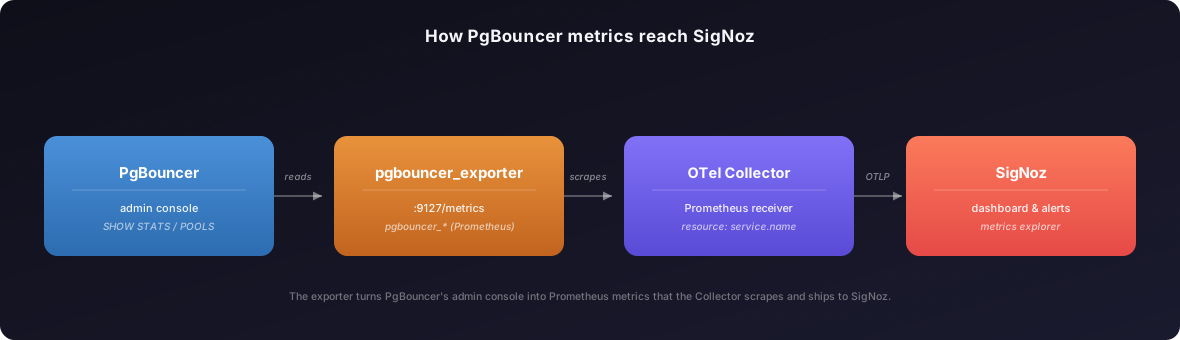
PgBouncer does not expose metrics the Collector can scrape on its own. The prometheus-community PgBouncer exporter reads PgBouncer's admin console and exposes pgbouncer_* Prometheus metrics. The Collector scrapes the exporter and ships the metrics to SigNoz over OTLP.
Steps
Step 1: Run the PgBouncer exporter
Run the exporter pointed at PgBouncer's virtual pgbouncer admin database:
pgbouncer_exporter \
  --pgBouncer.connectionString="postgres://<user>:<password>@<pgbouncer-host>:6432/pgbouncer?sslmode=disable" \
  --web.listen-address=":9127"
Replace the placeholders:
<user>:<password>: a PgBouncer user listed in stats_users<pgbouncer-host>:6432: your PgBouncer host and port
The database in the connection string must be pgbouncer. That is the built-in admin console, not an application database.
Confirm the exporter exposes metrics:
curl -s localhost:9127/metrics | grep '^pgbouncer_' | headLook for pgbouncer_up 1 plus several pgbouncer_pools_* and pgbouncer_stats_totals_* series.
Step 2: Configure the Collector
Add a PgBouncer scrape job, a resource processor that tags metrics with service.name, and a dedicated pipeline. The SigNoz dashboard filters on service.name, so keep that processor.
receivers:
  prometheus/pgbouncer:
    config:
      scrape_configs:
        - job_name: pgbouncer
          scrape_interval: 15s
          static_configs:
            - targets: ["<exporter-host>:9127"]

processors:
  resource/pgbouncer:
    attributes:
      - key: service.name
        value: pgbouncer
        action: upsert

service:
  pipelines:
    metrics/pgbouncer:
      receivers: [prometheus/pgbouncer]
      processors: [resource/pgbouncer, batch]
      exporters: [otlphttp]
Replace <exporter-host>:9127 with where the Step 1 exporter listens, use localhost:9127 if it runs on the same host. If you do not have an otlphttp exporter yet, add one for SigNoz Cloud:
exporters:
  otlphttp:
    endpoint: "https://ingest.<region>.signoz.cloud:443"
    headers:
      signoz-ingestion-key: "<your-ingestion-key>"
Verify these values:
<region>: your SigNoz Cloud region<your-ingestion-key>: your SigNoz Cloud ingestion key
Then apply the config where your Collector runs:
The config lives at /etc/otelcol-contrib/config.yaml. Validate it, restart, and watch the logs:
sudo /usr/bin/otelcol-contrib validate --config /etc/otelcol-contrib/config.yaml
sudo systemctl restart otelcol-contrib
sudo journalctl -u otelcol-contrib -fAdd the config to the file you mount into the Collector container, then restart and watch the logs:
docker compose up -d
docker compose logs -fNest the same receivers, processors, and service.pipelines blocks under otelDeployment.config in your override-values.yaml for the SigNoz K8s Infra chart, using the in-cluster exporter Service as the scrape target:
otelDeployment:
  config:
    receivers:
      prometheus/pgbouncer:
        config:
          scrape_configs:
            - job_name: pgbouncer
              scrape_interval: 15s
              static_configs:
                - targets: ["pgbouncer-exporter.default.svc.cluster.local:9127"]
    processors:
      resource/pgbouncer:
        attributes:
          - key: service.name
            value: pgbouncer
            action: upsert
    service:
      pipelines:
        metrics/pgbouncer:
          receivers: [prometheus/pgbouncer]
          processors: [resource/pgbouncer, batch]
          exporters: [otlphttp]
Apply it and watch the logs:
helm upgrade --install <release-name> signoz/k8s-infra -n signoz -f override-values.yaml
kubectl logs -n signoz <collector-pod-name> -f
Validate
- Open Metrics Explorer in SigNoz
- Search for metrics that start with
pgbouncer_. - You should see metrics such as
pgbouncer_up.

Troubleshooting
pgbouncer_up is 0 or the exporter fails to start
- Likely cause: the exporter cannot reach or authenticate against the PgBouncer admin console.
- Fix: confirm the connection string targets the
pgbounceradmin database, the user is listed in stats_users, and the user can authenticate against the admin console when auth_type isscram-sha-256ormd5. - Verify: rerun
curl localhost:9127/metricsand look forpgbouncer_up 1.
No pgbouncer_ metrics in SigNoz
- Likely cause: the Collector cannot reach the exporter, or the
metrics/pgbouncerpipeline does not include the receiver. - Fix: confirm the exporter is reachable from the Collector host with
curl <exporter-host>:9127/metrics, and confirm prometheus/pgbouncer is in themetrics/pgbouncerpipeline. Check the Collector logs for scrape errors. - Verify: search for
pgbouncer_upin Metrics Explorer.
Metrics appear but the dashboard is empty
- Likely cause: the
metrics/pgbouncerpipeline does not include the resource/pgbouncer processor, so PgBouncer metrics do not have service.name. - Fix: add resource/pgbouncer to the
metrics/pgbouncerprocessors list and restart the Collector. - Verify: filter Metrics Explorer by
service.name = pgbouncer.
pgbouncer_stats_* series are flat
- Likely cause: the
pgbouncer_stats_totals_*counters only move when queries pass through PgBouncer. - Fix: generate client traffic through PgBouncer.
- Verify: the counter values increment between scrapes.
Next Steps
- Import the prebuilt PgBouncer dashboard.
- Read how to Set up Alerts in SigNoz.
Get Help
If you need help with the steps in this topic, please reach out to us on SigNoz Community Slack. If you are a SigNoz Cloud user, please use in product chat support located at the bottom right corner of your SigNoz instance or contact us at cloud-support@signoz.io.


