The OpenTelemetry Operator manages OpenTelemetry Collectors and auto-instrumentation in a Kubernetes cluster through custom resources. As a SigNoz collection agent, it runs the two pre-configured collectors described below, which Foundry declares as OpenTelemetryCollector resources.
Install the operator, then install the collectors with Foundry through Helm or Kustomize.
The OpenTelemetry Operator Collection Agent primarily performs the following:
- Tails and parses container logs and sends them to SigNoz.
- Collects kubelet metrics and host metrics from every node.
- Gathers cluster-level metrics and Kubernetes events from the Kubernetes API server.
- Receives OTLP traces, metrics, and logs from your applications and forwards them to SigNoz.
- Injects auto-instrumentation into your workloads through
Instrumentationresources.
How it works
Operator architecture
The OpenTelemetry Operator works through Kubernetes custom resources and a controller:
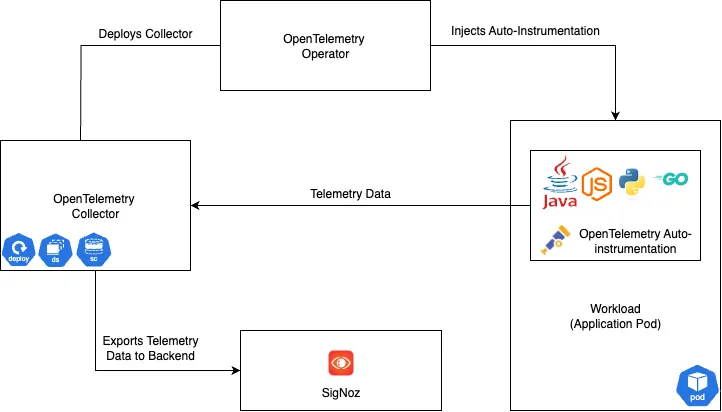
- Custom resources: The operator defines Custom Resource Definitions (CRDs) for OpenTelemetry components, such as
OpenTelemetryCollector. Custom resources of these kinds declare the desired state of your telemetry collection. - Controller: The operator's controller watches these custom resources. When one changes, it reconciles the current state of the cluster with the desired state the resource declares. The operator owns the workloads it creates and reverts edits made to them directly, so change a Collector, including its version, through its
OpenTelemetryCollectorresource. It also upgrades theOpenTelemetryCollectorresources when the operator itself is upgraded, and adds health checks to the Collector pods. - OpenTelemetry Collector: From each
OpenTelemetryCollectorresource, the controller creates and configures the Collector's workload and Services. - Auto-instrumentation: The operator can also manage auto-instrumentation for your applications, so they send telemetry without manual code changes.
For a deeper dive into the operator, see the OpenTelemetry Operator documentation.
Agent (DaemonSet)
The agent is an OpenTelemetryCollector resource in daemonset mode, so the operator runs one collector pod on every node. It collects node-level and pod-level data:
- Container logs: Kubernetes container logs via
filelog/k8sfrom/var/log/pods/*/*/*.log. - Host metrics: CPU, disk, filesystem, load, memory, and network via
hostmetrics. - Kubelet metrics: container, pod, node, and volume metrics via
kubeletstats. - OTLP: traces, metrics, and logs from your applications over OTLP/gRPC (4317) and OTLP/HTTP (4318).
- Resource attributes: Kubernetes and host resource attributes via the
k8sattributesandresourcedetectionprocessors.
Cluster collector (Deployment)
The cluster collector is an OpenTelemetryCollector resource in deployment mode, which the operator runs as one pod. It collects cluster-level data:
- Cluster metrics: node and pod conditions, allocatable resources, and container runtime and kubelet version resource attributes via
k8s_cluster. - Kubernetes events: via
k8s_events. - Resource attributes: via the
k8sattributesandresourcedetectionprocessors.
Cluster-level metrics come from this one collector, so each Kubernetes object is reported once.
Auto-instrumentation
The OpenTelemetry Operator greatly simplifies the process of auto-instrumenting your applications. By defining an Instrumentation custom resource, you can automatically inject the OpenTelemetry SDK into your application's runtime. This eliminates the need for manual code modifications to collect traces, metrics, and logs.
The operator can inject and configure OpenTelemetry auto-instrumentation libraries. Currently, Apache HTTPD, .NET, Go, Java, Nginx, Node.js and Python are supported.
To manage automatic instrumentation, the Operator must be configured to identify which pods to instrument and select the appropriate automatic instrumentation for those pods. This configuration is done through the Instrumentation CRD and adding Annotations to the workloads.
K8s-Infra vs OpenTelemetry Operator
When deciding between SigNoz’s K8s Infra Collection Agent and the OpenTelemetry Operator, the choice often comes down to setup simplicity versus auto-instrumentation. K8s Infra is installed with the k8s-infra Helm chart or with Foundry. With Foundry, both Collection Agents run the same SigNoz collector config; the operator manages the collectors through OpenTelemetryCollector resources and adds auto-instrumentation.
Why and When k8s-infra
- Fast Setup: Install it with the
k8s-infraHelm chart or with Foundry, and it collects metrics, traces, logs, and Kubernetes events. - SigNoz-Ready: Pre-configured for SigNoz (dashboards, alerts, integrations work out of the box).
- Minimal Overhead: The collectors run as a DaemonSet and a Deployment, with no operator, CRDs, or cert-manager to install.
Use K8s Infra when you want a quick, production-ready way to start sending Kubernetes telemetry to SigNoz without learning OTel Collector internals. For more information, refer to the K8s Infra Collection Agent.
Why and When OpenTelemetry Operator
- Auto-Instrumentation: Injects OpenTelemetry auto-instrumentation (SDKs and language agents) into application pods.
- K8s-Native Management: Manages the collectors through
OpenTelemetryCollectorresources.
Use the Operator when you require features like auto-instrumentation.
Recommended Approach
Begin with K8s Infra for cluster and infrastructure monitoring: it’s optimized for SigNoz and minimizes operational overhead. Gradually introduce the Operator for workloads that require auto-instrumentation, and point its Instrumentation resource at the K8s Infra agent (see Send Data from Applications to the Collector).


