The problem
Your app is slow. A user reports an error. A request takes 8 seconds instead of 200 milliseconds. You open the code, but the code looks fine. What happened in production?
Without data from inside your running application, you are guessing. You need telemetry — the signals that tell you what your app is doing, where it spends time, and when it fails. OpenTelemetry is how teams produce those signals today.
Where OpenTelemetry fits in
OpenTelemetry (usually called OTel) is a free, open-source toolkit that produces telemetry from your application and sends it somewhere you can use it. It supports most major languages and works with any compatible monitoring tool.
A simple mental model:
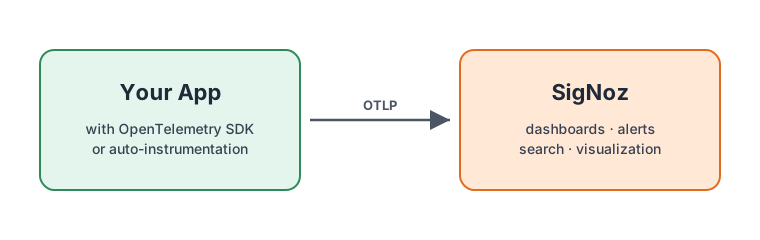
- OpenTelemetry sits in your app, collects the telemetry, and ships it out.
- A backend like SigNoz receives that telemetry, stores it, and gives you dashboards, search, and alerts.
OpenTelemetry does not store data or draw dashboards. That is the backend's job. See What is SigNoz? for more on the backend side.
The three kinds of telemetry
OpenTelemetry collects three kinds of data:
- Traces — The path of a single request across your services. Answers "why was this request slow?"
- Metrics — Numbers over time, like requests per second or CPU usage. Good for dashboards and alerts.
- Logs — Text messages your app writes when something happens.
Together, these give you a full view of how your system behaves.
Why OpenTelemetry instead of a vendor agent?
Most observability vendors ship their own agent and SDK. Whichever one you pick becomes part of every service, every deploy pipeline, and every runbook. Switching later means ripping out instrumentation from every service and starting over — so most teams stay put even when the tool stops fitting.
OpenTelemetry ends that lock-in. You instrument once, using an open standard. After that:
- Any compatible backend accepts your data. OTel flows to SigNoz, but also to Datadog, New Relic, Grafana, Honeycomb, and others. Picking a backend no longer means picking an agent.
- Switching backends is a configuration change. You update an export endpoint; you do not re-instrument every service.
- You can run two backends in parallel. Compare tools with real traffic before committing, or route different signals to different destinations.
- Consistent data across services. OTel's semantic conventions standardize attribute names, so "HTTP status code" or "DB query" means the same thing across every service and every language.
OpenTelemetry is a CNCF project with contributors from 1,100+ companies. It is the industry standard — even proprietary vendors now support OTel because customers expect it. See the official overview for more background.
Already using a vendor agent? Moving is less work than it looks
If you run Datadog, New Relic, or another vendor's agent today, the move can feel like two projects: switch to OpenTelemetry, then integrate SigNoz. In practice it is one project — the OTel instrumentation step is the migration.
A few things typically reduce the effort:
- Auto-instrumentation covers the common cases. For most popular frameworks (HTTP servers, database clients, queues), replacing a vendor agent with OTel auto-instrumentation is a drop-in swap, not a rewrite.
- SigNoz accepts OTel natively. No proprietary exporter or bridging layer between your app and SigNoz.
- Migrate one signal at a time. Run your current vendor and SigNoz side by side, and move traces, then metrics, then logs at your own pace. If you need to keep Datadog Agents running during the move, the Datadog Receiver can forward their metrics to SigNoz through the OpenTelemetry Collector while you migrate the rest.
Vendor-specific plans: Migrate from Datadog · All migration guides.
The effort compounds in your favor. A vendor-specific agent is a decision you pay for again every time you switch. OpenTelemetry is the one decision that does not need to be remade.
Getting started
The simplest path:
- Create a SigNoz Cloud account (or run Self-Hosted SigNoz).
- Pick one service in your app.
- Add OpenTelemetry auto-instrumentation for its language. For many supported languages, this requires little or no code change.
- Point the data at SigNoz, which accepts OpenTelemetry natively.
- Start with traces. Add metrics and logs when you are ready.
The backend side: dashboards, search, and alerts on your OpenTelemetry data.
Instrument your app with OpenTelemetry and start sending traces to SigNoz.
Collect logs with OpenTelemetry, agents like FluentBit, or existing log libraries.
Ingest metrics from applications, infrastructure, and Prometheus sources.


