Collect AWS Lambda logs by running an OpenTelemetry Collector instance as a Lambda extension layer. The collector registers with Lambda's Telemetry API to receive logs. You do not need to change your function code.
SigNoz Cloud users: You can also use the One-Click AWS Integration for automated setup with pre-built dashboards. See the comparison guide to choose the best approach.
AWS Lambda Logs via S3: Prefer routing logs via CloudWatch Logs and S3? Use AWS Lambda Logs via S3 for a code-free approach to collect logs.
Application Logs: If you want to send application logs from Node.js Lambda functions directly (to correlate with traces), refer to the AWS Lambda Node.js Guide.
Prerequisites
- An AWS account with permission to create and modify Lambda functions and layers.
- Your SigNoz Cloud region and ingestion key. Find these under Settings → Ingestion Settings in the SigNoz UI.
How it works
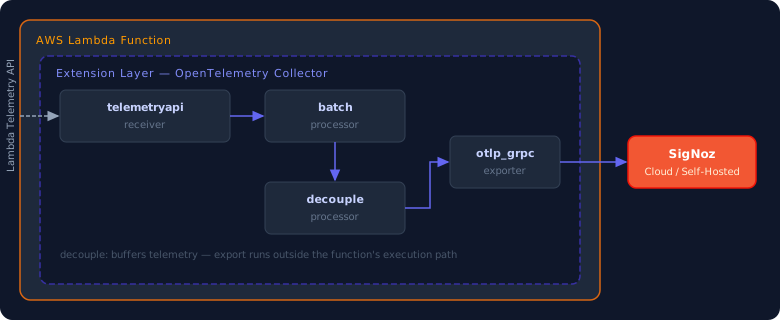
When a Lambda function initializes, the OpenTelemetry Collector starts as an extension layer and registers with the Lambda Telemetry API. As the function executes, Lambda automatically pushes logs and platform events to the collector.
To ensure telemetry export doesn't impact your function's performance or billable duration, the collector uses a decouple processor. This processor buffers logs in memory and separates telemetry transmission from the function's main execution path. Because the function doesn't wait for network calls to SigNoz to complete, the buffered logs are asynchronously sent in the background during the next invocation or shutdown phase.
Setting up OTel Collector extension layer for Lambda logs
Step 1: Add the OTel Collector extension layer
- Open your Lambda function in the AWS console.
- Go to Layers → Add a layer → Specify an ARN.
- Paste the ARN for the OpenTelemetry Collector layer that matches your function's architecture and region.
Find the latest ARN on the opentelemetry-lambda releases page. ARNs follow the pattern:
arn:aws:lambda:<aws-region>:184161586896:layer:opentelemetry-collector-<arch>-<version>:<layer-version>
Replace <aws-region>, <arch> (amd64 or arm64), and <version> with the values from the latest release.
The account 184161586896 is the official AWS account maintained by the OpenTelemetry community for publishing Lambda layers.
Step 2: Create the collector configuration
Create a file named collector.yaml at the root of your Lambda deployment package (it will be available at /var/task/collector.yaml at runtime).
receivers:
  telemetryapi:

exporters:
  otlp_grpc:
    endpoint: 'https://ingest.<region>.signoz.cloud:443'
    headers:
      signoz-ingestion-key: '<your-ingestion-key>'

processors:
  batch:
  decouple:
  resource:
    attributes:
      - key: service.name
        value: "lambda-func-test"
        action: upsert
      - key: deployment.environment
        value: "production"
        action: upsert

service:
  pipelines:
    logs:
      receivers: [telemetryapi]
      processors: [resource, batch, decouple]
      exporters: [otlp_grpc]
Verify these values:
<region>: Your SigNoz Cloud region<your-ingestion-key>: Your SigNoz ingestion key
otlp_grpcrequires Collector v0.145.0 or later (bundled in recent Lambda layer releases). If you use an older layer, replaceotlp_grpcwithotlp.- You can add resource attributes in the
resourceprocessor to enrich your logs with metadata. Adjust theservice.nameanddeployment.environmentvalues as needed. - You can add type of logs to export by adding types field to
telemetryapireceiver. By default, it receives all logs and platform events. For example, to receive onlyfunctionlogs, use:receivers: telemetryapi: types: ["function"]
Step 3: Point the extension to your config
Set the following environment variable on your Lambda function:
| Variable | Value |
|---|---|
OPENTELEMETRY_COLLECTOR_CONFIG_URI | /var/task/collector.yaml |
To set it in the AWS console: go to Configuration → Environment variables → Edit → Add environment variable.
Remote config URIs (S3 or HTTP) add cold-start latency because the collector fetches the file before starting. Embed the config in the deployment package to avoid this overhead.
Step 4: Deploy and invoke
Deploy your updated Lambda function and invoke it. The collector initialises on the first invocation. It exports logs during that invocation or the next one.
Validate
- In SigNoz, open Logs → Logs Explorer.
- Filter by
service.name = 'lambda-func-test'or service name set by you in the config. - You should see Lambda platform logs (
START,END,REPORT) and anystdout/stderroutput from your function.
Logs appear with a delay. The decouple processor transmits buffered telemetry at the start of the next invocation or during the Lambda shutdown phase, creating a lag between function execution and log arrival in SigNoz.


Troubleshooting
No logs appearing in SigNoz
- Verify the
OPENTELEMETRY_COLLECTOR_CONFIG_URIenvironment variable is set and points to the correct path. - Check CloudWatch Logs for the Lambda function's log group — the extension layer logs its own startup and any config errors there.
- Confirm the layer ARN matches your function's architecture (
amd64vsarm64) and region. otlp_grpcrequires Collector v0.145.0 or later (bundled in recent Lambda layer releases). If you use an older layer, replaceotlp_grpcwithotlpin your collector configuration.
Cold-start latency increased
- Embed
collector.yamlin the deployment package instead of fetching it over the network. - The decouple processor stops export from blocking the function. Collector initialisation on the first invocation adds small overhead.
Logs missing for short-lived functions
- Lambda skips the shutdown phase for short-lived functions. Invoke the function at least twice to flush buffered telemetry from the first run.
Next Steps
- opentelemetry-lambda on GitHub — layer releases and source
- Send AWS Lambda logs via S3
- Send AWS Lambda Traces to SigNoz
- One-Click AWS Integration for Lambda
Get Help
If you need help with the steps in this topic, please reach out to us on SigNoz Community Slack.
If you are a SigNoz Cloud user, please use in product chat support located at the bottom right corner of your SigNoz instance or contact us at cloud-support@signoz.io.


