Overview
The OpenTelemetry Injector instruments Java, Node.js, .NET, and Python applications on a Linux host with no code change. You install a system package, and LD_PRELOAD loads its shared library into every new process. The library sets the variables that start the OpenTelemetry agent. Use it when one host runs services in several languages, so the SigNoz endpoint and ingestion key live in one file.
Prerequisites
- A Linux host that runs Debian, Ubuntu, RHEL, Fedora, or Amazon Linux, on amd64 or arm64.
- Root access on that host. The injector writes to
/etc/ld.so.preloadand reads configuration from/etc/opentelemetry/. - An application that runs on one of these runtimes:
- Java
- Node.js 20.6 or later. Node.js 18.19 and later 18 releases also work. Node.js 19, and Node.js 20.0 to 20.5, do not.
- .NET 8 or later
- Python 3.10 or later
- An instance of SigNoz (either Cloud or Self-Hosted).
How it works
The injector library runs at the start of every new process on the host.
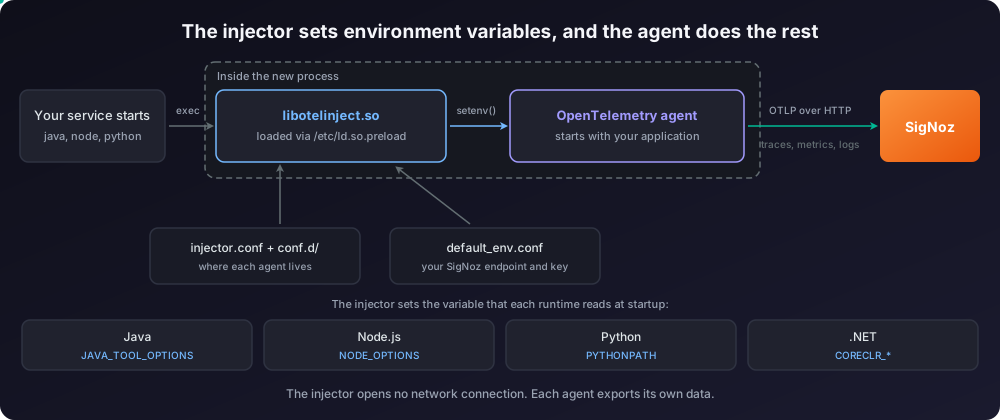
For each process, the injector does the following:
- It reads which C library the process uses, either glibc or musl. A statically linked binary never loads the injector, because the dynamic linker does not run for it.
- It reads the agent paths from
/etc/opentelemetry/injector/injector.confand the drop-in files inconf.d/. Each language package installs one drop-in file. - It sets the variables that start the agent, and adds the variables from
default_env.conf, which holds your SigNoz endpoint and key.
The injector opens no network connection. Each agent exports its own telemetry to the endpoint you configure.
You get traces and metrics from every language. Logs arrive only when the application logs through a framework that the agent instruments: Logback or Log4j for Java, Winston, Pino, or Bunyan for Node.js, ILogger for .NET, and the logging module for Python. System.out.println and console.log send no logs.
Send data to SigNoz
Step 1. Install the packages
Add the package repository and install the metapackage. The metapackage installs the injector and the agents for all four languages.
echo "deb [trusted=yes] https://open-telemetry.github.io/opentelemetry-packaging/debian stable main" | sudo tee /etc/apt/sources.list.d/opentelemetry.list
sudo apt update
sudo apt install opentelemetrycat <<EOF | sudo tee /etc/yum.repos.d/opentelemetry.repo
[opentelemetry]
name=OpenTelemetry Auto-Instrumentation System Packages
baseurl=https://open-telemetry.github.io/opentelemetry-packaging/rpm/packages
enabled=1
gpgcheck=0
EOF
sudo dnf install opentelemetryThe opentelemetry-injector package adds /usr/lib/opentelemetry/injector/libotelinject.so to /etc/ld.so.preload during installation. You do not have to edit that file. The install prints this line when it succeeds:
OpenTelemetry Injector installed successfully.Step 2. Point the agents at SigNoz
The file /etc/opentelemetry/injector/default_env.conf holds the environment variables that every agent on the host receives. By default the agents export to localhost, so you must set your SigNoz endpoint here.
Append the three variables below:
cat <<'EOF' | sudo tee -a /etc/opentelemetry/injector/default_env.conf
OTEL_EXPORTER_OTLP_ENDPOINT=https://ingest.<region>.signoz.cloud:443
OTEL_EXPORTER_OTLP_HEADERS=signoz-ingestion-key=<your-ingestion-key>
OTEL_EXPORTER_OTLP_PROTOCOL=http/protobuf
EOF
Verify these values:
<region>: Your SigNoz Cloud region.<your-ingestion-key>: Your SigNoz ingestion key.
The injector passes only the variables that start with OTEL_. It drops every other line in this file.
Step 3. Name each service
The injector reads OTEL_INJECTOR_SERVICE_NAME from the environment of the process and writes it to the service.name attribute. Set this variable per service. If you set one name in default_env.conf, every process on the host reports under that single name in SigNoz.
For a service that systemd starts, add the variable to a unit override. Replace <unit-name> with the systemd unit, for example payments, and <service-name> with the name you want in SigNoz:
sudo systemctl edit <unit-name>Add these two lines in the editor that opens, then save the file:
[Service]
Environment=OTEL_INJECTOR_SERVICE_NAME=<service-name>
Step 4. Restart the applications
The injector acts on new processes only. Restart each application that you want to instrument:
sudo systemctl restart <unit-name>Processes that were already running keep their old environment until you restart them.
Validate
Send a few requests to your application, then open SigNoz.
Open Services. Your service appears with request rate, error rate, and latency within a minute or two.
Open Traces and filter by your service name. Incoming HTTP requests appear as server spans, and calls to databases and other services appear as child spans.

Open Metrics and filter on one service. The agent reports HTTP duration and count, and the runtime metrics for its language.

Open Logs and filter by your service name. Only an application that logs through an instrumented framework sends logs here. Each record carries the trace ID and the span ID of the request, so you can move from the log to its trace.

To confirm that the injector acted on one process, start that process with the injector log turned up:
OTEL_INJECTOR_LOG_LEVEL=debug <your start command>The injector prints one line for each variable it sets, in every language:
[otel-injector] [12345] setting "JAVA_TOOL_OPTIONS"="-javaagent:/usr/lib/opentelemetry/java/opentelemetry-javaagent.jar"
[otel-injector] [12345] setting "NODE_OPTIONS"="--require /usr/lib/opentelemetry/nodejs/register.js"
[otel-injector] [12345] setting "PYTHONPATH"="/usr/lib/opentelemetry/python/glibc"
A Java application also names the agent on its first line of output:
Picked up JAVA_TOOL_OPTIONS: -javaagent:/usr/lib/opentelemetry/java/opentelemetry-javaagent.jarChoose which processes the injector instruments
By default the injector instruments every process on the host, and not only the services that you care about. Build tools and helper processes send data too. A dotnet build on the host, for example, makes the Roslyn compiler server appear in SigNoz as a service named VBCSCompiler. Narrow the set before you run the injector on a busy host.
Four settings in /etc/opentelemetry/injector/injector.conf control which processes the injector acts on. Each one takes a comma-separated list of glob patterns:
include_paths: Instrument only the executables whose path matches.exclude_paths: Skip the executables whose path matches.include_with_arguments: Instrument only the processes whose command line matches.exclude_with_arguments: Skip the processes whose command line matches.
The rules combine as follows. Patterns inside one setting are alternatives, so one match is enough. Different settings all apply, so a process must satisfy each setting that you configure. An exclusion always wins over an inclusion.
A pattern matches the resolved path of the executable, not the path that you typed. On Debian, /usr/bin/java is a symbolic link, so the pattern /usr/bin/java matches nothing. Run readlink -f on the command first and use the path that it prints:
readlink -f /usr/bin/javaThis example instruments the programs under /app, skips the ones under /app/system, and skips any Java process that already loads an agent:
include_paths=/app/*
exclude_paths=/app/system/*
exclude_with_arguments=-javaagent:*
To turn off one language, set auto_instrumentation_disabled in the same file. Valid values are dotnet, jvm, nodejs, python, and ruby. The value * turns off all of them:
auto_instrumentation_disabled=dotnet,pythonTo turn the injector off for a single program, set OTEL_INJECTOR_DISABLED=true in the environment of that program. The injector then changes no environment variable for it.
Set this variable in the systemd unit of the program, or in a shell that the injector has not touched. The injector also runs for your shell, so an interactive shell already exports JAVA_TOOL_OPTIONS, NODE_OPTIONS, and PYTHONPATH. A child process inherits those values. A command such as OTEL_INJECTOR_DISABLED=true java -jar app.jar therefore still starts the agent, because the shell passed the variables down before the injector ran.
Add resource attributes
The injector reads a set of OTEL_INJECTOR_* variables from the process environment and adds them to OTEL_RESOURCE_ATTRIBUTES. Set them the same way you set OTEL_INJECTOR_SERVICE_NAME, per process:
| Variable | Resource attribute |
|---|---|
OTEL_INJECTOR_SERVICE_NAME | service.name |
OTEL_INJECTOR_SERVICE_VERSION | service.version |
OTEL_INJECTOR_SERVICE_NAMESPACE | service.namespace |
OTEL_INJECTOR_RESOURCE_ATTRIBUTES | The key-value pairs you supply, added as they are |
If OTEL_RESOURCE_ATTRIBUTES already holds a key, the injector keeps the existing value.
Troubleshooting
Turn on the injector log first. Set OTEL_INJECTOR_LOG_LEVEL=debug in the environment of the application, then restart it. The injector writes its log to the standard error stream of the instrumented process. Read the log of the application to see it. The injector keeps no log file of its own. Valid levels are debug, info, warn, error, and none. The default is error.
Still no data in SigNoz? Work through Debug missing traces, logs, and metrics, which covers agent diagnostics, Collector connectivity, and the common ingestion errors.
No process is instrumented
- Cause: The library is not in
/etc/ld.so.preload, or the file is not readable by other users. - Fix: Run
cat /etc/ld.so.preloadand make sure that it holds the line/usr/lib/opentelemetry/injector/libotelinject.so. Runls -l /etc/ld.so.preloadand make sure that the mode is0644. The dynamic linker ignores the file for a non-root process when other users cannot read it. - Verify: Restart the service with
OTEL_INJECTOR_LOG_LEVEL=debug. The injector prints asetting "..."line for the variable of your runtime.
Every service reports under the same name
- Cause:
OTEL_SERVICE_NAMEorOTEL_INJECTOR_SERVICE_NAMEis set indefault_env.conf, so all processes share one name. - Fix: Remove the name from
default_env.confand setOTEL_INJECTOR_SERVICE_NAMEin each systemd unit instead. - Verify: Each service appears under its own name in the SigNoz Services list.
A .NET application sends nothing
- Cause: The application targets .NET 7 or earlier, or its
*.deps.jsonfile already referencesOpenTelemetry*packages. - Fix: Move the application to .NET 8 or later. If the application already carries the OpenTelemetry SDK, keep the SDK and let the injector stand down. .NET accepts one agent only.
- Verify: The injector debug log records the runtime version that it read from
*.runtimeconfig.json.
A Go, Rust, or C++ application sends nothing
- Cause: The injector supports Java, Node.js, .NET, and Python only. A statically linked binary, such as a Go binary built without cgo, never loads the injector at all. The dynamic linker that reads
/etc/ld.so.preloaddoes not run for it. - Fix: Use eBPF instrumentation for these languages, or the matching language guide.
- Verify: Spans from the service appear in SigNoz after you set up the other method.
Spans appear twice
- Cause: The application starts its own agent, and the injector adds a second one.
- Fix: Add
exclude_with_arguments=-javaagent:*to/etc/opentelemetry/injector/injector.conf, or setOTEL_INJECTOR_DISABLED=truefor that program. - Verify: A trace in SigNoz holds one span per operation.
A Python application sends nothing and prints a dependency conflict
The agent writes a line like this to the standard error stream of the Python process:
[opentelemetry-python-autoinstrumentation] WARN: cannot auto-instrument Python process: dependency conflicts: {'asgiref': {'version_required': '==3.12.1', 'version_found': '3.6.0'}}- Cause: The Python agent pins exact versions of its own dependencies. A package that the operating system installed holds a different version, so the agent stops instead of breaking the application. The system Python on Debian 12 hits this with
asgiref. - Fix: Run the application in a virtual environment that does not carry the conflicting package. The agent instruments a virtual environment correctly, because it prepends its own directory to
PYTHONPATH. If you cannot use a virtual environment, turn off Python injection withauto_instrumentation_disabled=pythonin/etc/opentelemetry/injector/injector.confand follow the Python guide instead. - Verify: The warning stops, and the service appears in the SigNoz Services list.
Setup OpenTelemetry Collector (Optional)
Run an OpenTelemetry Collector on the host when you want to process, filter, or route telemetry before it reaches SigNoz. The Collector also gives every service on the host one egress point and one copy of the ingestion key. Follow the Switch to Collector guide for setup instructions.
Then point the agents at the local Collector in /etc/opentelemetry/injector/default_env.conf:
OTEL_EXPORTER_OTLP_ENDPOINT=http://127.0.0.1:4318
OTEL_EXPORTER_OTLP_PROTOCOL=http/protobuf
Write the address as 127.0.0.1. Node.js resolves localhost to the IPv6 address ::1 first. A Collector that listens on 127.0.0.1 only rejects that connection. The Node.js agent then fails with connect ECONNREFUSED ::1:4318, while the Java agent on the same host keeps working.
Limitations
- The injector runs on Linux only, on Debian and RHEL derivatives.
- It instruments Java, Node.js 20.6 or later, .NET 8 or later, and Python 3.10 or later. Node.js 18.19 and later 18 releases also work. The upstream library also supports Ruby, but the package repository ships no Ruby agent.
- It needs root to install, and it changes
/etc/ld.so.preload, a file that affects every process on the host. - It acts on new processes only. A running process keeps its environment until you restart it.
- The packages are at version
v0.0.3, and the upstream project calls the current repository URLs interim.
Next steps
- Set up alerts on error rate and latency for the services you now see.
- Read the instrumentation overview to compare the injector with the language SDKs.
- Use eBPF instrumentation for the services that the injector does not cover.
Get Help
If you need help with the steps in this topic, please reach out to us on SigNoz Community Slack. If you are a SigNoz Cloud user, please use in product chat support located at the bottom right corner of your SigNoz instance or contact us at cloud-support@signoz.io.


