This guide shows you how to send logs from a Convex backend to SigNoz using Convex log streaming.
Convex log streaming sends logs as JSON or JSONL webhooks with HMAC-SHA256 signatures. SigNoz ingests logs via its JSON logs endpoint. You'll need to deploy a small Express service that:
- Receives and verifies Convex webhook requests
- Transforms Convex log events for SigNoz
- Forwards them to SigNoz Cloud
Prerequisites
- A Convex project on the Professional plan (log streaming requires this plan)
- A SigNoz Cloud account with an ingestion key
- Node.js 18+ installed locally or a platform to deploy the bridge (Vercel, Railway, AWS, etc.)
Architecture
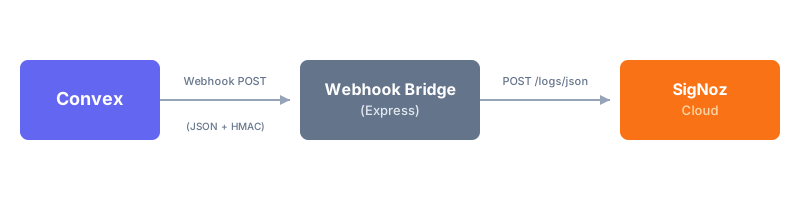
The Webhook Bridge handles:
- Security: Verifies
x-webhook-signatureheader using HMAC-SHA256 - Parsing: Supports both JSON and JSONL formats from Convex
- Transformation: Adds a
bodyfield and structures attributes for SigNoz - Export: Sends logs to SigNoz via the native JSON logs endpoint
Step 1: Create the Webhook Bridge
Create a new directory and initialize a Node.js project:
mkdir convex-signoz-bridge
cd convex-signoz-bridge
npm init -y
npm install express
Create a file named index.js with the following code:
import express from "express";
import crypto from "node:crypto";

const app = express();
const port = process.env.PORT || 3080;

// Parse all request bodies as text for signature verification
app.use(
  express.text({
    type: "*/*",
    limit: "5mb",
  })
);

app.post("/webhook", async (req, res) => {
  const textPayload = req.body;
  const signature = req.headers["x-webhook-signature"];

  if (!signature) {
    return res.status(401).send("Unauthorized: Missing signature");
  }

  if (!process.env.WEBHOOK_SECRET) {
    console.error("Missing WEBHOOK_SECRET environment variable");
    return res.status(500).send("Server configuration error");
  }

  try {
    // 1. Verify HMAC-SHA256 Signature
    const hmacSecret = await crypto.subtle.importKey(
      "raw",
      new TextEncoder().encode(process.env.WEBHOOK_SECRET),
      { name: "HMAC", hash: "SHA-256" },
      false,
      ["verify"]
    );

    const isValid = await crypto.subtle.verify(
      "HMAC",
      hmacSecret,
      Buffer.from(signature.replace("sha256=", ""), "hex"),
      new TextEncoder().encode(textPayload)
    );

    if (!isValid) {
      return res.status(401).send("Unauthorized: Invalid signature");
    }

    // 2. Parse Payload (JSON or JSONL)
    let logs;
    try {
      logs = JSON.parse(textPayload);
      if (!Array.isArray(logs)) logs = [logs];
    } catch {
      // Try JSONL format
      logs = textPayload
        .split("\n")
        .filter((line) => line.trim())
        .map((line) => JSON.parse(line));
    }

    // 3. Handle Verification Ping
    if (logs.length === 1 && logs[0].topic === "verification") {
      console.log("Received verification ping from Convex");
      return res.send("Verification successful");
    }

    // 4. Replay Attack Protection
    const firstLog = logs[0];
    if (firstLog.timestamp && firstLog.timestamp < Date.now() - 5 * 60 * 1000) {
      return res.status(403).send("Request expired");
    }

    // 5. Transform and Send to SigNoz
    await sendToSigNoz(logs);
    res.send("Success");
  } catch (error) {
    console.error("Error processing webhook:", error);
    res.status(500).send("Internal server error");
  }
});

async function sendToSigNoz(logs) {
  const ingestionKey = process.env.SIGNOZ_INGESTION_KEY;
  const serviceName = process.env.SERVICE_NAME || "convex-logs";

  if (!ingestionKey) {
    console.warn("Skipping SigNoz export: Missing SIGNOZ_INGESTION_KEY");
    return;
  }

  const url = `https://ingest.<region>.signoz.cloud:443/logs/json`;

  const transformedLogs = logs.map((log) => {
    const newLog = { ...log };

    // Set resource attributes
    newLog.resources = {
      "service.name": serviceName,
    };

    // Map Convex log_level to OTel severity_text
    const severityMap = {
      DEBUG: "DEBUG",
      INFO: "INFO",
      LOG: "INFO",
      WARN: "WARN",
      ERROR: "ERROR",
    };
    newLog.severity_text = severityMap[log.log_level] || "INFO";

    // Add a 'body' field for the log message
    if (!newLog.body) {
      if (newLog.message) {
        newLog.body = newLog.message;
      } else if (newLog.topic === "function_execution" && newLog.function) {
        newLog.body = `Function: ${newLog.function.path} (${newLog.status || "unknown"}) in ${newLog.execution_time_ms ?? "?"}ms`;
      } else if (newLog.topic === "audit_log") {
        newLog.body = `Audit: ${newLog.audit_log_action}`;
      } else {
        newLog.body = `Convex: ${newLog.topic}`;
      }
    }

    // Structure attributes for querying in SigNoz
    newLog.attributes = {
      "convex.topic": newLog.topic,
      "convex.deployment": newLog.convex?.deployment_name,
      "convex.project": newLog.convex?.project_name,
      ...newLog.attributes,
    };

    return newLog;
  });

  const response = await fetch(url, {
    method: "POST",
    headers: {
      "Content-Type": "application/json",
      "signoz-ingestion-key": ingestionKey,
    },
    body: JSON.stringify(transformedLogs),
  });

  if (!response.ok) {
    const text = await response.text();
    console.error(`Failed to send to SigNoz: ${response.status} ${text}`);
  } else {
    console.log(`Sent ${logs.length} logs to SigNoz`);
  }
}

app.listen(port, () => {
  console.log(`Webhook Bridge running on port ${port}`);
});
Add "type": "module" to your package.json to enable ES modules:
{
  "type": "module"
}
Step 2: Configure and Run Webhook Bridge
Set the required environment variables:
export REGION="<region>"
export SIGNOZ_INGESTION_KEY="<your-ingestion-key>"
export WEBHOOK_SECRET="<your-convex-secret>"
export SERVICE_NAME="<service-name>"  # Optional
export PORT="<port>"  # Optional
Verify these values:
<region>: Your SigNoz Cloud region<your-ingestion-key>: Your SigNoz ingestion key<your-convex-secret>: The HMAC secret from your Convex dashboard<service-name>: (Optional) Service name for logs in SigNoz, defaults toconvex-logs<port>: (Optional) Server port, defaults to3080
Start the bridge:
npm run startTest the bridge is running:
curl -X POST http://localhost:3080/webhook -d '{"topic":"test"}' -H "x-webhook-signature: sha256=invalid"
# Expected: "Unauthorized: Invalid signature"
For production, deploy to any Node.js hosting platform (Railway, Render, AWS, etc.) and note the public HTTPS URL.
Step 3: Configure Convex Log Streaming
- Open your Convex Dashboard
- Go to Settings → Integrations
- Select Webhook (Log Stream)
- Set the webhook URL to your bridge endpoint:
https://<your-bridge-host>/webhook - Select format: JSON or JSONL
- Click Save
- Copy the HMAC Secret and set it as
WEBHOOK_SECRETin your bridge
Convex immediately starts sending logs to the webhook.
Validate
- Trigger a Convex function that produces logs (e.g.,
console.log("Hello from Convex")) - Open SigNoz → Logs Explorer
- Filter logs using:
convex.topicconvex.deploymentconvex.project
Logs should appear within a few seconds.


Limitations
- Log streaming requires the Convex Professional plan
- The Webhook Bridge must be publicly accessible over HTTPS
- Convex provides best-effort delivery (logs may be dropped under high load or duplicated on retry)
Troubleshooting
Still not seeing data in SigNoz? Work through Debug missing traces, logs, and metrics, which covers SDK diagnostics, Collector connectivity, and the common ingestion errors for all three signals.
Logs do not appear in SigNoz
Possible causes
- Webhook Bridge not reachable from the internet
SIGNOZ_INGESTION_KEYis incorrectWEBHOOK_SECRETdoesn't match the Convex dashboard
Fix
- Test the bridge URL is accessible:
curl https://<your-bridge>/webhook - Check bridge logs for errors
- Verify your SigNoz region and ingestion key
Bridge returns 401 Unauthorized
Possible causes
- HMAC signature verification is failing
WEBHOOK_SECRETenvironment variable is missing or wrong
Fix
- Ensure
WEBHOOK_SECRETexactly matches the secret from Convex dashboard - Check that the raw request body is being used for verification (not parsed JSON)
Missing log attributes in SigNoz
Possible causes
- Log transformation doesn't extract all fields from your event type
Fix
- Add console logging to inspect the raw Convex payload
- Update the
transformedLogsmapping to include additional fields - See the Convex log event schema for all available fields
Next Steps
- Explore the Logs Explorer to query and filter Convex logs
- Create alerts on Convex error logs or specific log patterns
- Learn how to create dashboards to visualize your Convex log trends
Get Help
If you need help with the steps in this topic, please reach out to us on SigNoz Community Slack. If you are a SigNoz Cloud user, please use in product chat support located at the bottom right corner of your SigNoz instance or contact us at cloud-support@signoz.io.


